Forum Discussion

Excel Challenge
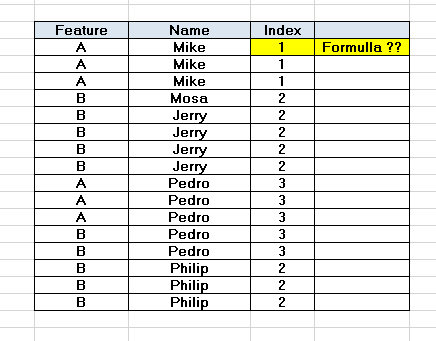
- Jul 07, 2020
=MMULT(--(COUNTIFS($B$2:$B$17,B2,$A$2:$A$17,{"A","B"})>0),{1;2})

=MMULT(--(COUNTIFS($B$2:$B$17,B2,$A$2:$A$17,{"A","B"})>0),{1;2})
MMULT is a function I'd not seen before.
Frankly, the Help text on the function isn't very helpful in understanding it. Can you explain how it's working here to solve the question asked by @Jalal_1988
- Detlef_LewinJul 07, 2020Silver Contributor
I'm not good at explaining MMULT(). So I have to refer to the support page. The key text is: The result is an array with the same number of rows as array1 and the same number of columns as array2.
array1 has one row (and two columns) and array2 has one column (and two rows). So the output is an array with one row and one column.
- mtarlerJul 07, 2020Silver Contributor
Detlef_Lewin that is a clever solution
mathetes mmulti() stands for matrix multiply which goes back to linear algebra days.
I started to try and explain it here but you would be much better served with a website designed to teach it like https://www.google.com/url?sa=t&rct=j&q=&esrc=s&source=web&cd=&cad=rja&uact=8&ved=2ahUKEwj2y6HcmrzqAhUFLs0KHfvBDbUQFjAAegQIAhAB&url=https%3A%2F%2Fwww.mathsisfun.com%2Falgebra%2Fmatrix-multiplying.html&usg=AOvVaw2H0BMrqG1AOypxo5VF-pz8
