Forum Discussion

Excel Challenge
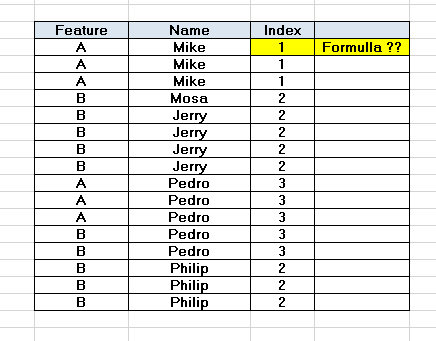
- Jul 07, 2020
=MMULT(--(COUNTIFS($B$2:$B$17,B2,$A$2:$A$17,{"A","B"})>0),{1;2})


Are you able to reorganize the data to a cleaner table, as in the attached? If so, a simple IFS formula gives the resulting "Index" value. In general, if it's possible for all your data, you're better off having any one customer occupy only one row. Especially where the only differences have to do with one or two elements of information, because they can be handled by different columns on the same, single row.
If there's some other compelling reason to have multiple rows per person, please spell that out. You might then be better served by having two or more tables, connecting them via Power Query or some other feature.
I've attached the spreadsheet, but here's an image for your review. The formula is visible as well. That formula is just copied down to the other rows.