Forum Discussion

Excel bubble chart: how to size bubbles based on no. of items with identical x and y values?
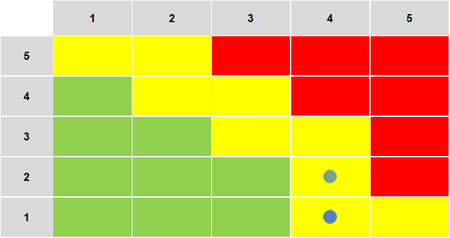
 Apr 07, 2021
A bubble needs 3 argument. You have to add a counter column:
Probability Impact n 4 1 3 4 1 3 4 1 3 4 2 1 Select row 2-5 (not the headers) and insert a bubble and i should be Ok (if you use a 2-D chart. In a 3D chart you will se that you have stacked 3 bubbles on top of each other).
You can create the 3:d column with
=COUNTIFS($A$2:$A$5,A2,$B$2:$B$5,B2)
Anther way is to use a Pivot table to create something like:
Probability Impact n 4 1 3 4 2 1 But you cant use it in a pivotChart so it's kind of pointless
A bubble needs 3 argument. You have to add a counter column:
| Probability | Impact | n |
| 4 | 1 | 3 |
| 4 | 1 | 3 |
| 4 | 1 | 3 |
| 4 | 2 | 1 |
Select row 2-5 (not the headers) and insert a bubble and i should be Ok (if you use a 2-D chart. In a 3D chart you will se that you have stacked 3 bubbles on top of each other).
You can create the 3:d column with
=COUNTIFS($A$2:$A$5,A2,$B$2:$B$5,B2)
Anther way is to use a Pivot table to create something like:
| Probability | Impact | n |
| 4 | 1 | 3 |
| 4 | 2 | 1 |
But you cant use it in a pivotChart so it's kind of pointless
