Forum Discussion

ExpertGamerHD
Aug 26, 2022Copper Contributor
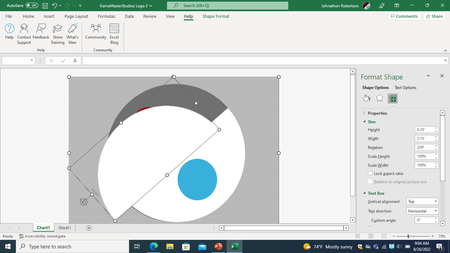
Excel boundaries issue

mtarler
Aug 26, 2022Silver Contributor
That is because you took a 1/2 circle and rotated it. It is NOT an excel issue per se. You can easily expand the boundary or insert and object like "partial circle", "chord", or "arc" all of which will allow you adjust the portion of the circle you want (i.e. the 1/2 circle in the upper left) and NOT rotate the whole object and hence the container box will not be rotated like that. Here is a screenshot of me inserting each of those options:
- ExpertGamerHDAug 29, 2022Copper ContributorI have build 2207, which might be an earlier or later version of yours, which might explain why I can't expand the boundary or adjust the proportion of the circle I want.
- mtarlerAug 29, 2022Silver ContributorI don't think it is a version. I can't control the boundaries of objects either. The only boundary I was suggesting was the page boundary. As for the objects, I don't know where that 1/2 circle came from and my suggestion was to make a 1/2 circle using one of the tools built in but make it with the circle already at the correct angle.
