Forum Discussion

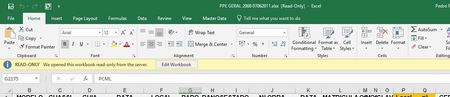
Excel book located in Sharepoint open as "read only" by default

- Nov 24, 2018
Hi,
With the introduction of co-authoring mode that disappeared, please check https://blogs.technet.microsoft.com/office_integration__sharepoint/2015/11/12/excel-2016-opens-sharepoint-workbooks-as-read-only/, thus for today that's version issue.
Also
https://tcsp360.com/blog/issues-and-solutions/ms-excel-2016-opens-workbooks-read/

Hi Sergei,
Thanks for your reply.
I've realised that we are still working with version 16.0.9
Thank you for your help.
Regards

You are welcome. Hope you'll update soon.
- FBorgesNov 26, 2018Copper Contributor
Hi again Sergei,
I was wrong about the version... We have already 1803.
Is it possible that have been changes after version 1707?
- SergeiBaklanNov 26, 2018Diamond Contributor
Microsoft deploys new functionality gradually, version 1707 only means that functionality was first introduced with this build, after that it's deployed step by step by channels and by tenants.
for example, Collaborative editing functionality on semi-annual channel (targeted) was started deploying from September this year from build 1808.10730.20102 https://docs.microsoft.com/en-us/officeupdates/semi-annual-channel-targeted-2018
You are on semi-annual channel, thus it'll be even later, at least I didn't find it for your channel https://docs.microsoft.com/en-us/officeupdates/semi-annual-channel-2018, you may check yourselves.
Anyway, you may check, if you have co-authoring (aka collaborative editing) you shall have no such alert.