Forum Discussion

Excel Attendance Formula Help: Sum of attendance points for all dates w/in 6 months of infraction
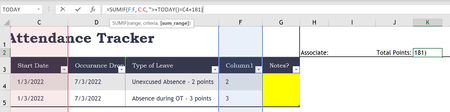
- Mar 17, 2022
HiCBHRBP
depending on your local settings, it might be that you need to replace the ; with , in the formula.
So instead of
=SUMIFS(F2:F7;A2:A7;I1;C2:C7;">="&TODAY()-181)
it might be
=SUMIFS(F2:F7,A2:A7,I1,C2:C7,">="&TODAY()-181)
The other thing is, that you need to adjust the cell references to the real situation in your worksheet. When I look at your screenshot, it should be
=SUMIFS(F4:F10,A4:A10,I2,C4:C10,">="&TODAY()-181)

TY. I got an error I tried the formula but noticed it was in the wrong cell/s so I modified but either didn't work. Error came up.
I really appreciate you!

HiCBHRBP
depending on your local settings, it might be that you need to replace the ; with , in the formula.
So instead of
=SUMIFS(F2:F7;A2:A7;I1;C2:C7;">="&TODAY()-181)
it might be
=SUMIFS(F2:F7,A2:A7,I1,C2:C7,">="&TODAY()-181)
The other thing is, that you need to adjust the cell references to the real situation in your worksheet. When I look at your screenshot, it should be
=SUMIFS(F4:F10,A4:A10,I2,C4:C10,">="&TODAY()-181)
- CBHRBPMar 17, 2022Copper ContributorMartin_Weiss you Sir are a true wizard and brilliant! Thank you tremendously!!!!!!! Thank you is an understatement!