Forum Discussion

Excel active checkbox
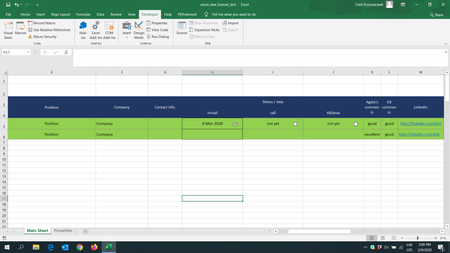

GlebsKozlovskis Allow me to offer the simplest of solutions, requiring no VBA and no checkboxes. Instruct the user to press Ctrl+; (control and semi-colon simultaneously). This enters the current date into the active cell.
Otherwise, your solution looks nice but I fear that it will not work. The use of TODAY() makes the date dynamic. In your example you checked the box on the 9th of March. Have a look at the schedule now, and I bet that it reads March 10.

Dear Riny_van_Eekelen, thank you for your solution, yet the task is a bit more complicates.
Please, feel free to check another forum, where we're actively trying to figure out the situation, which appeared to be even more complicated.
https://answers.microsoft.com/en-us/msoffice/forum/msoffice_excel-mso_win10-mso_o365b/excel-active-checkbox/003c8a9f-b391-4914-bef0-3aa2ac34cffb?tm=1583760644301&auth=1