Forum Discussion

Excel 365 text wrap issues, and page layout view vs print preview view issue
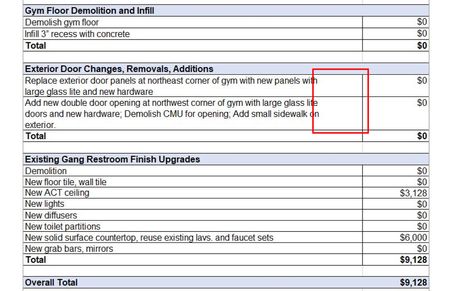

It's not really clear why what you're experiencing--differences between different views--is a problem. Excel is adjusting to the circumstances and different views, print settings. But it isn't "wrong" per se, is it. Just different.
If you have a specific layout in mind, specific words you want on one line, not on the next or prior, let us know. But this looks like a legitimate estimate sheet for a work project as is.
Or am I missing something?

The file will function as is...it's not a problem, more aesthetics I guess. Was just looking for a solution to the issues presented...why the text wrap feature doesn't work properly, and why there isn't a view available that actually matches what will be printed.
Specific layouts?
Item 1 - Have the indicated text fill the column width and wrap.
Item 2 - Have the layout view match the actual printed view/ print.
Item 3 - Have the indicated text fill the column height and wrap.
Just thought i was doing something wrong. If there's no solution, so be it.
Appreciate the input.
John
 Manisha327Jun 17, 2022Copper ContributorHaving the same issue. Have you found any work around?
- John_F_at_ACJun 20, 2022Copper Contributor
Manisha327 ...
No...other than trying to use Word instead. Excel is for for numbers, Word is for words....they should rename Excel to "Number".
- ratherbehomeFeb 09, 2023Copper ContributorNew here, but had the same issue but couldn't find a solution anywhere online. I found out that if I change my zoom to 110% in Excel, it wrapped exactly the same on the screen as print preview and the actual print job (to PDF). I'm using Calibri 11, so I'm not sure if different fonts react differently. I'm also using merged cells, word wrap, and the justify cell alignment. It also may be impacted by my monitor size and resolution, so 110% may not work for everyone, but you can experiment.