Forum Discussion

EXCEL 365 Dynamic Array Search()
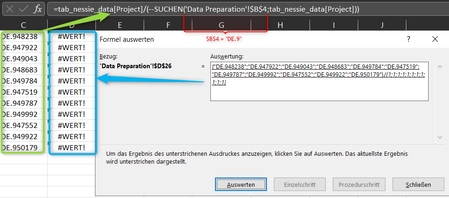
- May 30, 2022
Use the third optional argument in FILTER (i.e. if_empty).
=IFERROR(FILTER(Table1[Project],SEARCH($B$4,Table1[Project],1)>=1),"")
No need for the IFERROR on the SEARCH part either.

Riny_van_Eekelen Alphanumeric characters are stored in a column with over one hundred thousand cells. When entering characters in a form field, the content in the dropdown menu should be restricted with each additional character (without double entries).
When using numbers, my solution works very quickly and precisely.
=SORTIEREN(EINDEUTIG(WENN(ODER(cap_id=" ";cap_id="");"";FILTER(tab_data[ID];
WENNNV(tab_data[ID]=WENNFEHLER(tab_data[ID]/(SUCHEN(cap_id;tab_data[ID])>=1);"");"")));FALSCH;FALSCH);1)

Heiko_Tiedemann Sorry. Difficult to follow based on a picture and a German formula. But I guess that when you work with numbers, dividing that number by 1 results in that number. but perhaps the attached file is something you had in mind.
- Heiko_TiedemannMay 30, 2022Copper Contributor
Riny_van_Eekelen
Hi Riny,
This is a simple and great solution. (Please do not get this wrong)
I made some changes so that the function works on the filters () regardless of the length and position.=FILTER(Table1[Project];IFERROR(SEARCH($B$4;Table1[Project];1)>=1;"FALSE"))
Another question: Is there a solution to suppress "#CALC" ("CALC") as an erroneous result, such as "IFERROR".
THX- Riny_van_EekelenMay 30, 2022Platinum Contributor
Heiko_Tiedemann Ooops! Sorry, but I missed the purpose of the IFERROR in your original formula. I believe you need to have it as you had it.
So it would be like this:
=IFERROR(FILTER(Table1[Project],IFERROR(SEARCH($B$4,Table1[Project])>=1,0)),"")
- Riny_van_EekelenMay 30, 2022Platinum Contributor
Use the third optional argument in FILTER (i.e. if_empty).
=IFERROR(FILTER(Table1[Project],SEARCH($B$4,Table1[Project],1)>=1),"")
No need for the IFERROR on the SEARCH part either.
- Heiko_TiedemannMay 30, 2022Copper ContributorHi Riny,
I'm verry happy with your Support. Great Job 👍 See you soon