Forum Discussion

EXCEL 365 Dynamic Array Search()
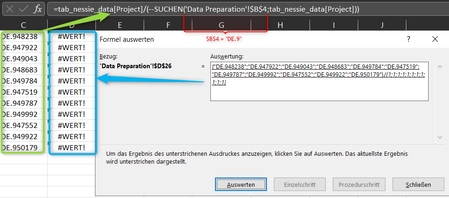
- May 30, 2022
Use the third optional argument in FILTER (i.e. if_empty).
=IFERROR(FILTER(Table1[Project],SEARCH($B$4,Table1[Project],1)>=1),"")
No need for the IFERROR on the SEARCH part either.


Since you divide text on number, like ="text"/1

SergeiBaklan Thank's for the answer to my question.
Is there a solution to my challenge from your point of view. Importantly, the solution works in conjunction with the Filter()-/Array function. The data area is extremely extensive, so that only a solution with a very low run-time is practicable.
I'm looking forward to your proposal.
Many thanks
- Riny_van_EekelenMay 30, 2022Platinum Contributor
Perhaps you can start by explaining what the challenge is. As SergeiBaklan explained, all your formula does is divide an array of texts by an array of numbers 1. Hence, it generates only VALUE errors. Obviously, that's not your goal. But what do you want to achieve?
- Heiko_TiedemannMay 30, 2022Copper Contributor
Riny_van_Eekelen Alphanumeric characters are stored in a column with over one hundred thousand cells. When entering characters in a form field, the content in the dropdown menu should be restricted with each additional character (without double entries).
When using numbers, my solution works very quickly and precisely.=SORTIEREN(EINDEUTIG(WENN(ODER(cap_id=" ";cap_id="");"";FILTER(tab_data[ID];
WENNNV(tab_data[ID]=WENNFEHLER(tab_data[ID]/(SUCHEN(cap_id;tab_data[ID])>=1);"");"")));FALSCH;FALSCH);1)- Riny_van_EekelenMay 30, 2022Platinum Contributor
Heiko_Tiedemann Sorry. Difficult to follow based on a picture and a German formula. But I guess that when you work with numbers, dividing that number by 1 results in that number. but perhaps the attached file is something you had in mind.