Forum Discussion

EXCEL - HOW TO MOVE MULTIPLE DATA (ONLY) FROM COLUMN TO OTHER COLUMN BLANK
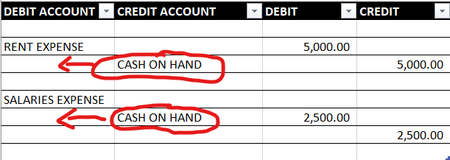
- Aug 10, 2022


RanzieJ You need VBA coding to cut/move data. Give a try on below sub. Assuming you Credit Account column is B. You have to adjust Range("B2:B200") for you real case.
Sub MoveData()
Dim rng As Range

    For Each rng In Range("B2:B200")
        If rng <> "" Then
            rng.Offset(, -1) = rng
            rng.Clear
        End If
    Next rng

End Sub

 sivakumarrjAug 10, 2022Brass Contributor
Simply select Column B & Column C,
Under Data heading Click filter button
Select Column B with Blanks
Next Select Column C with Cash or Cash in Hand
Now it will display with rows of Cash
Type formula in Cell B5 = C5(Cash)
then copy formula and then do special paste with values
after that you delete the b column
- LorenzoAug 10, 2022Silver Contributor
This isn't advanced at all but pretty classic Power Query transformation
#1 Format your data formatted as Table:
#2 Go to Data (tab) > From Table/Range (Power Query editor opens)
#3 Go to Transform tab
#4 Select columns [DEBIT ACCOUNT] & [CREDIT ACCOUNT] > Merge Columns
#5 By default the new column name is "Merged". Change this with i.e. DEBIT/CREDIT ACCOUNT > OK
#6 File > Close & Load
- RanzieJAug 17, 2022Copper ContributorGot it, Thank you so much! Godbless!