Forum Discussion

Excel - Get Data from PDF is Missing
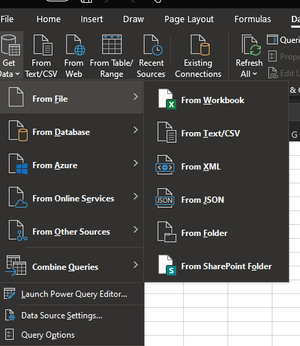

You are on semi-annual channel which is updated with new functionality twice per year, in Jan in Jul. Monthly Enterprise channel was updated with PDF connector in Oct 2020 Release notes for Monthly Enterprise Channel releases in 2020 - Office release notes | Microsoft Docs , semi-annual shall be updated few months later and I didn't find PDF connector in Jan update for that channel Release notes for Semi-Annual Enterprise Channel releases in 2020 - Office release notes | Microsoft Docs
Thus you shall wait till July or upgrade on Monthly Enterprise or Current channels. That's free of charge and above channels are stable enough. However, which channel to use depends mostly on your organization ITS policies, are they ready to provide more or less new functionality to end users or prefer to wait couple of years till all possible fixes will be deployed.

Hi, I am using Office Home & Student 2019 and I am missing the From PDF option as well. I am not a techie person and I do not understand what the channels mean. is there another way to get this option?
- LorenzoJul 15, 2022Silver Contributor
Hi Raphael1175
For Excel version, channel... Within Excel: go to File > Account, on the right side - i.e.:
The From File > From PDF option (in Excel User Interface) isn't available in all versions of Excel & Channels (no idea for Excel 2019 Home & Student). Such option allows users to easily do something (through a wizard) that could be +/- complex otherwise
However, it's not because the option doesn't appear in the Excel User Interface that don't have access to the corresponding Power Query function (Pdf.Tables). To check this on your version of Excel:
- Download the attached file & open it
- In Sheet1 rigth-click on the following Table
- Select the Refresh option
Once the Refresh is complete, search in that Table for Pdf.Tables. If you find that occurence it means your version of Excel can import Tables from PDF files
If you have Pdf.Tables function let us know and someone will explain how to use it...
 jang_klein_58Aug 13, 2023Copper Contributor
Lorenzo Hi, I did the check and the entry "Pdf.Tables is in the list.
Please let me know to to proceed further.
Thanks- LorenzoAug 14, 2023Silver ContributorHi. Look 7 posts above yours
 tungvba93Nov 04, 2022Copper Contributor
Hi, I downloaded your file and it show Pdf.tables
Could you please teach me how to use the import PDF function because I could not find it in data tab
 AsanteeliJul 31, 2022Copper Contributor
Lorenzo I have downloaded the file and refreshed and now have the pdf.table in it. How do i go about importing the pdf document into my excel?
 shahdarshakAug 01, 2022Copper ContributorAsanteeli
here is the article from Lorenzo please follow that
The article is available (https://answers.microsoft.com/en-us/msoffice/forum/all/power-query-get-transform-get-data-from-pdf/1bd2afdc-2912-4b08-aae6-40250b0d589d) and explains the Next step when you get a You CAN import Tables from PDF files with the in used product
