Forum Discussion

Excel - Fill in values from column and row based on specific criteria to make list
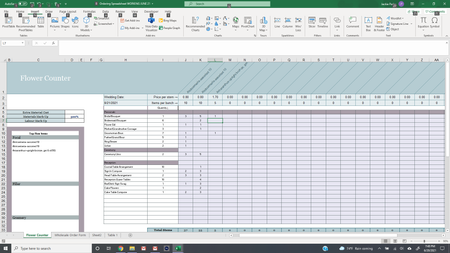

Hi jacparks,
I added some named ranges:
Then used this formula in the card from this range using:
=FILTER(Ingredients,NOT(ISBLANK(Ingredients)))
In
and put a formula:
=IF(OR($B5="Focal",$B5="Filler",$B5="Greenery",$B5="Line",$B5="Hardgoods / Rentals",ISBLANK(B5)),"","Insert IF STATEMENT HERE")
Comments:
In the quantity column is not a good practice to have duplicate values. for example:
Alstroemeria-assorted 10
Alstroemeria-assorted 10
Amaranthus-upright bronze, grn & rd BG
There are two Alstroemeria entries (vlookup or index match cannot be used)
If you have any questions, please do not hesitate to reach out.
Cheers
 jacparksJun 23, 2021Copper ContributorHi! For this formula
and put a formula:
=IF(OR($B5="Focal",$B5="Filler",$B5="Greenery",$B5="Line",$B5="Hardgoods / Rentals",ISBLANK(B5)),"","Insert IF STATEMENT HERE")
Where it says if statement here, I'm not exactly sure what I'm putting there.
Something like this? This doesn't work but am I on the right track?
=IF('Flower Counter'!J6 > 0, ='Flower Counter'!J6, "")- Yea_SoJun 23, 2021Bronze Contributor
Hi jacparks ,
The formula does not have to be an if statement, it can be an index match or whatever formula that is appropriate to bring the actual values you would want to appear in that column, the preceding if statement is just to put a blank value if the row is occupied by the ingredient label i.e. focal...etc. So you could put:
=IF(OR($B9="Focal",$B9="Filler",$B9="Greenery",$B9="Line",$B9="Hardgoods / Rentals",ISBLANK(B9)),"",HLOOKUP($B$6,'Flower Counter'!$H$1:$AC$31,MATCH($B$3,'Flower Counter'!H:H,0),0))
Cheers
- Yea_SoJun 23, 2021Bronze Contributor
Hi jacparks ,
I forgot to remove the $ in row cell reference should not be $B$6, but should be $B6 in the HLOOKUP part:
=IF(OR($B6="Focal",$B6="Filler",$B6="Greenery",$B6="Line",$B6="Hardgoods / Rentals",ISBLANK(B6)),"",HLOOKUP($B6,'Flower Counter'!$H$1:$AC$31,MATCH($B$3,'Flower Counter'!H:H,0),0))The Match reference refers to the Title of the card which is "Bridal Bouquet"
MATCH($B$3,'Flower Counter'!H:H,0), which returns the Bridal Bouquet row number in the "Flower Counter" Tab
attached is the updated file
- jacparksJun 22, 2021Copper ContributorThanks so much! I won’t normally have the same two flowers I was just making sure they would auto fill. I really appreciate your help!