Forum Discussion

hoacvxd
Sep 11, 2022Tin Contributor
Error displaying formulas in excel
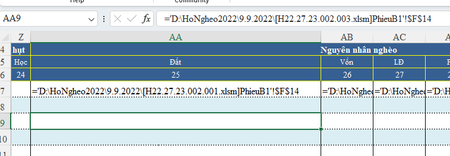
I am using Office365 and often encounter formulas in some cells of the spreadsheet. As shown in the picture, cell AA7 shows the formula while the other cells don't, currently the position cursor is ...
- Sep 11, 2022
hoacvxd I suspect the cells concerned are, perhaps accidentally, formatted as text. change the format to General, press F2 to enter the formula bar and press Enter to confirm the formula.

Riny_van_Eekelen
Sep 11, 2022Platinum Contributor
hoacvxd I suspect the cells concerned are, perhaps accidentally, formatted as text. change the format to General, press F2 to enter the formula bar and press Enter to confirm the formula.

hoacvxd
Sep 21, 2022Tin Contributor
This workaround only works temporarily, when the formula is updated this error occurs again.
Is there any way to completely solve it?
Is there any way to completely solve it?
- Riny_van_EekelenSep 21, 2022Platinum Contributor
hoacvxd Don't understand. Can you share the file? Upload it in the Forum or share it via OneDrive or similar.
- hoacvxdOct 20, 2022Tin Contributor
- Riny_van_EekelenOct 20, 2022Platinum Contributor
hoacvxd Downloaded your file. It showed this:
Calculation set to Automatic, cell format "General". Needed to go into the formula bar (F2) and press enter. Don't really understand why. Can't replicate it on my own system. Sorry.