Forum Discussion

Employee attendance tracker
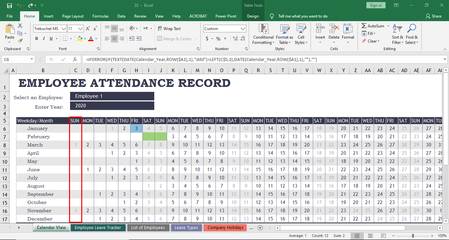

Riny_van_Eekelen is there a way to change the calendar function to a fiscal year? Our fiscal year runs April 2022 - March 2023. It would be great to have stats from the fiscal year and not calendar year.

You could begin by dragging the first three rows in the table (i.e. B6:AR9) to the bottom so that you will end up with a calendar from April to March. But then you have to increase the year number by 1 in the DATE functions in the first six and last six columns on the bottom three rows.
For instance, cell C15 (January) will then look like this:
=IFERROR(IF(TEXT(DATE(Calendar_Year+1,ROW($A1),1),"ddd")=LEFT(C$5,3),DATE(Calendar_Year+1,ROW($A1),1),""),"")
Otherwise the January row will still refer to 2022 where you want it to be 2023.
It should work but you need to test it thoroughly and I can't guarantee that it will not have any side affects elsewhere. This particular template is built with quit ancient techniques, one of the worst I've seen.
- Sp00kyGeaRDec 13, 2023Copper Contributor
Hi Riny
I have tried to add the +1 as you suggest as i also need to change this to a fiscal year but when i add this and complete the line ( it requires me to go in and add the dates manual) when i add a test date in for January 2025 for example it is adding it to the year 2025 and not the fiscal year created on the 2024 tab.
any ideas?- Riny_van_EekelenDec 13, 2023Platinum Contributor
Sp00kyGeaR Not really. Sorry!
As I mentioned before, this is one of the worst templates I've come across. Use it as it is or not if it doesn't do what you need.
But, if you have a file (with your modifications) I can look at, I can give it a try. No guarantees, though. Paste a link giving access to your file on a file sharing service (Onedrive, Dropbox etc.)
- Sp00kyGeaRDec 13, 2023Copper Contributor
Many thanks for the offer of help.
Here is a link to the file to download (i wouldnt open it on there as the formulas dont work)
https://docs.google.com/spreadsheets/d/1YNtd-mj2t2iMvKrIMHeVKCfDcxKGB7LD/edit?usp=drive_link&ouid=103181818242659046577&rtpof=true&sd=true
- TrevorJBJul 05, 2022Copper Contributor
Riny_van_Eekelen Thank you. I will give it a try. Is there a newer template you would suggest using that isn't using old techniques?
- Riny_van_EekelenJul 05, 2022Platinum Contributor
TrevorJB Sorry, no. I would probably create something myself. something simple, flexible and easy to maintain.