Forum Discussion

Owen_Howell
Mar 23, 2021Copper Contributor
Editing Tag database
Hi, I have asked on a few forums about this issue re the location of and how to edit - the tags database in Excel/Windows File Manager - and have had a few folks guess at the solution but have ne...

Owen_Howell
Apr 05, 2021Copper Contributor
Many Thanks Sergei - I found that Tags area now but I now see I misled you by including Excel - I am actually wanting to get to the Windows Explorer tags editing facility. Do you have any insight into that ?
Cheers.
Owen
Cheers.
Owen

SergeiBaklan
Apr 06, 2021Diamond Contributor
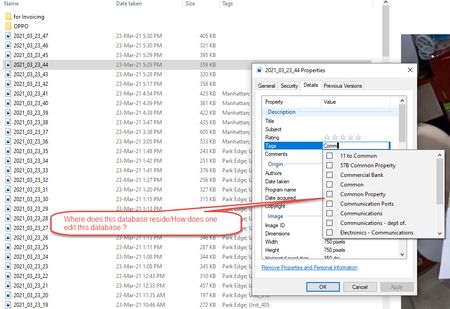
You may edit tags in File Explorer, as well as other properties. Select one or more files, right click , Properties->Details
- Owen_HowellApr 06, 2021Copper ContributorHi Sergei - thanks for trying to help.
Cheers. - SergeiBaklanApr 06, 2021Diamond Contributor
Sorry, I'm not so deep in this, don't know.
- Owen_HowellApr 06, 2021Copper Contributor
Hi Sergei - Great - we're almost there - so in the image I have inserted below I get the Properties; Details; Tags - but now here's the catch - as I start to type (in the Tags field) the word "Com....." as an example then a dropdown appears predicting what I am trying to type (this dropdown list is actually comprised of tags I have created/used before) and I want to delete a few words from this drop down list so my question is how do I delete misspelled words or any words for that matter in this drop down list .
Thank you again for sticking with me to solve this problem.