Forum Discussion

priyanksharma
Nov 26, 2021Copper Contributor
Dynamically Need to find out minimum value of each row after summation of multiple columns.
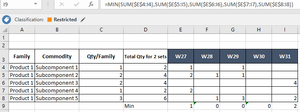
Hi I may not be very clear in describing subject. However I will try my best to elaborate issue here. I have to calculate minimum for each week and as we move to next week minimum should be calcul...

HansVogelaar
Nov 26, 2021MVP
Here is a custom VBA function that you can use
Function MinRowSum(rng As Range) As Double
    Dim r As Range
    Dim m As Double
    MinRowSum = 1E+308
    For Each r In rng.Rows
        MinRowSum = Application.Min(Application.Sum(r), MinRowSum)
    Next r
End Function
Leave one empty row between the data and the row with minimum values. So in your example, enter the formulas in row 10,
In E10:
=MinRowSum($E$4:E8)
Fill to the right to I10.
If you add a new week, fill the formula one more cell to the right.
If you want to add a new row, copy the last row with data and insert it into the same row, then edit its values.
The formulas will then include the new row.
 priyanksharmaDec 01, 2021Copper Contributor
Thanks Hans, its working as required.