Forum Discussion

Dynamic Unique List - 2 Columns
- Dec 26, 2021
Tony2021 Never tried that before but perhaps like in the attached file.
If this is not what you had in mind, I'd suggest you look into Power Query. Much more flexible and robust for these kind of tasks. At least in my humble opinion.

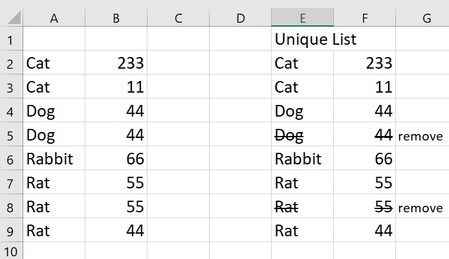
Tony2021 How about = UNIQUE(A2:B9) as shown in the picture below?
- Tony2021Dec 26, 2021Steel ContributorHello Riny, thats ingenious. I have a follow up though. In my "real" data set there are many columns between the columns I need for the array. How can I use 2 non contigous columns? Imagine that there is a column between columns A and B making the array to reference only column A and C. I tried to modify the array (with AND) but it didnt seem to work. I got a #value error. I hope that makes sense. Let me know if you have any questions.
- PeterBartholomew1Dec 26, 2021Silver Contributor
I rather liked Riny_van_Eekelen 's idea of applying a FILTER horizontally to allow the columns to be selected dynamically. If, on the other hand, the columns to be used are known ahead of time, the array to be filtered can be built using CHOOSE. For example
= UNIQUE(
    CHOOSE({1,2,3},
      Table1[Column1],
      Table1[Column3],
      Table1[Column5]
    )
  )
Being a modern function UNIQUE works as well on arrays as it does ranges. Using an Excel Table and ignoring the possibility of blanks. Riny's formula reduces to
= UNIQUE( FILTER(Table1,criterion) )- Tony2021Dec 26, 2021Steel ContributorWow. Peter that is amazing. I am learning new functions in excel. Thank you for the follow up. Both solutions work for me.
- Riny_van_EekelenDec 26, 2021Platinum Contributor
Tony2021 Never tried that before but perhaps like in the attached file.
If this is not what you had in mind, I'd suggest you look into Power Query. Much more flexible and robust for these kind of tasks. At least in my humble opinion.
- Tony2021Dec 26, 2021Steel ContributorHi Riny, could you kindly direct me to the functionality in PQ be for something like this? I think I might explore it.

