Forum Discussion

Dynamic Transformation to create separate series for charting
- Mar 13, 2022
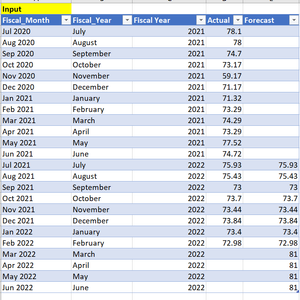
Pappu1630 The attached file contains an example of what I believe is what you asked for.
You would need an original Forecast (or Budget) column to begin with. One that might change while the year progresses (like column FC in the picture below). Then, another column contains the Actuals and yet another column calculates the Forecast for the remainder of the year. The formula is shown in the picture, cell D2. Returning NA() for the months that have an actual (except the last one) will cause these data points to be regarded as "empty cells" and, by default, be displayed as gaps. That is, they will not be connected with lines.


Pappu1630 Have attached a few more options. On with a regular pivot table and pivot chart directly on the data set, playing with the line formatting to segregate the actuals from the forecast.
Another example used PQ to add a column for the forecast numbers only. Then, load to the DM and create a pivot chart.