Forum Discussion

Dynamic Array Subtotal that changes its column sizes without using VBA or volatile functions
- Oct 23, 2023
you should be able to have nested Lambda functions. not sure what issue you had.
You could also just use the Project_Duration, Criteria1, Criteria2 as inputs:=LAMBDA( ProjectDuration, Criteria1, Criteria2, LET(criteria, --FILTER(TAKE(Criteria1:ProjectDuration, , -COLUMNS(ProjectDuration)), (TAKE(Criteria1:ProjectDuration, , 1) = Criteria1) * (TAKE(Criteria2:ProjectDuration, , 1) = TEXTBEFORE(Criteria2, " Subtotal"))), MMULT(SEQUENCE(, ROWS(criteria)) ^ 0, criteria)))
and BTW this worked for me:=LAMBDA(ProjectDuration, Criteria1, Criteria2, LET(criteria, --FILTER(TAKE(Criteria1:ProjectDuration, , -COLUMNS(ProjectDuration)), (TAKE(Criteria1:ProjectDuration, , 1) = Criteria1) * (TAKE(Criteria2:ProjectDuration, , 1) = TEXTBEFORE(Criteria2, " Subtotal"))), BYCOL(criteria, LAMBDA(c, SUM(c)))))

djclements so that is interesting. When I first tried it I thought I got an error like #VALUE or #NA error which I was assuming was a circular reference error just manifesting that way. I know it wouldn't actually be a circular reference but in the past it seemed excel flagged anything that could. Well, I just cleaned my solution up to not use the DROPs and seems fine. we don't even need that TAKE($D$6#,,-1) so:
=BYCOL(FILTER($D$6#:$D10,
             ($A$6:$A10=$A10)*($B$6:$B10=TEXTBEFORE($B10," Subtotal")),0),
       LAMBDA(c, SUM(c)))

mtarler Looking at your elegant solution inspired by djclements, I found a way to make my last attempt formula fully dynamic below:
=LET(Criteria,($A$5:$A$25=A9)*($B$5:$B$25=TEXTBEFORE($B9," Subtotal")),
MMULT(TRANSPOSE(FILTER(Criteria,Criteria=1)),--FILTER($D$5#:$D$25,Criteria=1))
)
By simply changing the range from $D$8:$L$26 to $D$5#:$D$25 where it's the combo of the spilled range and the last row & first column cell, it works as intended. I also could make a custom function out of this (named MONTHLYTOTAL):
=LAMBDA(criteria1_range,criteria1,criteria2_range,criteria2,project_duration,last_cell,
LET(Criteria,(criteria1_range=criteria1)*(criteria2_range=TEXTBEFORE(criteria2," Subtotal")),
MMULT(TRANSPOSE(FILTER(Criteria,Criteria=1)),--FILTER(project_duration:last_cell,Criteria=1)))
)
The custom function below can be copiable in column D :
=MONTHLYTOTAL($A$5:$A$25,A9,$B$5:$B$25,$B9,$D$5#,$D$25)
I couldn't convert both of your solutions into custom functions. I'm guessing those two have LAMBDA already and you can't have a nested LAMBDA function...?
It would be great if I can avoid using the last_cell ($D$25 in $D$5#:$D$25) somehow by referring to the criteria1 range instead, but I'm just happy with all of the solutions here working well 🙂
- DaeyunPabloOct 23, 2023Brass Contributor
mtarler Alternatively, I revised your formula that refers to the subtotal cell itself (D9) which I think is neater than referring to the last cell of the monthly hours table.
=LET(CriteriaArray,--FILTER(D5#:$D9,($A$5:$A9=$A9)*($B$5:$B9=TEXTBEFORE($B9," Subtotal"))),
MMULT(SEQUENCE(,ROWS(CriteriaArray))^0,CriteriaArray)
)
The custom function will be:
=LAMBDA(
project_duration,monthly_subtotal_cell,criteria1_begin,criteria1,criteria2_begin,criteria2,
LET(CriteriaArray,--FILTER(project_duration:monthly_subtotal_cell,(criteria1_begin:criteria1=criteria1)*(criteria2_begin:criteria2=TEXTBEFORE(criteria2," Subtotal"))),
MMULT(SEQUENCE(,ROWS(CriteriaArray))^0,CriteriaArray))
)
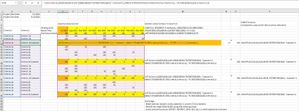
It looks like below:
- mtarlerOct 23, 2023Silver Contributor
you should be able to have nested Lambda functions. not sure what issue you had.
You could also just use the Project_Duration, Criteria1, Criteria2 as inputs:=LAMBDA( ProjectDuration, Criteria1, Criteria2, LET(criteria, --FILTER(TAKE(Criteria1:ProjectDuration, , -COLUMNS(ProjectDuration)), (TAKE(Criteria1:ProjectDuration, , 1) = Criteria1) * (TAKE(Criteria2:ProjectDuration, , 1) = TEXTBEFORE(Criteria2, " Subtotal"))), MMULT(SEQUENCE(, ROWS(criteria)) ^ 0, criteria)))
and BTW this worked for me:=LAMBDA(ProjectDuration, Criteria1, Criteria2, LET(criteria, --FILTER(TAKE(Criteria1:ProjectDuration, , -COLUMNS(ProjectDuration)), (TAKE(Criteria1:ProjectDuration, , 1) = Criteria1) * (TAKE(Criteria2:ProjectDuration, , 1) = TEXTBEFORE(Criteria2, " Subtotal"))), BYCOL(criteria, LAMBDA(c, SUM(c)))))- DaeyunPabloOct 23, 2023Brass Contributor
mtarler It can be that compact with three inputs only! Wonder which one is faster but I guess both are almost the same as the structures are quite similar (not very expensive as well). I'll use them well, thanks a million 🙂