Forum Discussion

Duplicate Columns
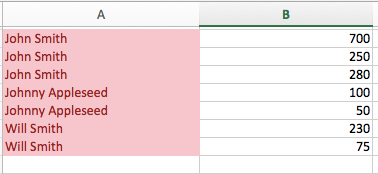

I'm trying to figure out the Pivot table and I'm having a little trouble.
The 'Donations!$A$1:D ....." screenshot is what pops up first when I hit the pivot table.
There's an A, B, C, and D column for their name, address, town, and how much they donated. A is the name column and B is the donations like I said earlier.
I hit the "Ok" button and I checked the name and aggregated ytd (aka donations) boxes.
The issue I'm having is I think it's adding the columns altogether (added the screenshot to show)
Am I missing a step? Do I have to highlight a certain section before hitting the pivot table button or do I have to put in something different under the "Select a table or range" part at the "Create PivotTable box? Thanks.

RileyTim184 From your screenshots I can see you're on a Mac. So, am I. That makes it easier to explain. When you created the table, you dragged both Name and Donation into the "Value field". Drag the Name into the "Rows" field (red arrow).
Now press the (i) to the right of where it says "Count of Amount" (blue arrow). It should look like this;
You'll ses the "Count" is highlighted in the "Summarise by" box. Select "Sum" to tell Excel you want to add up the amounts, not count them. The end result will look like this (use the file I uploaded with my initial response as a reference):
Now, if you never got this far and Excel defaulted to count amounts, it means that your list of donations contains texts. They may look like numbers, but they are not. Then you need to fix that first. To see if your amounts are (or contain) texts, put the formula =ISNUMBER(D2) in E2 and copy it all the way down. If anywhere it returns FALSE you'll find your text. Let me know your findings.
- RileyTim184Nov 29, 2020Copper Contributor
It worked! Thank you so much, I really appreciate it. You just saved me so much time, thanks again.