Forum Discussion

Do Until Loop Code
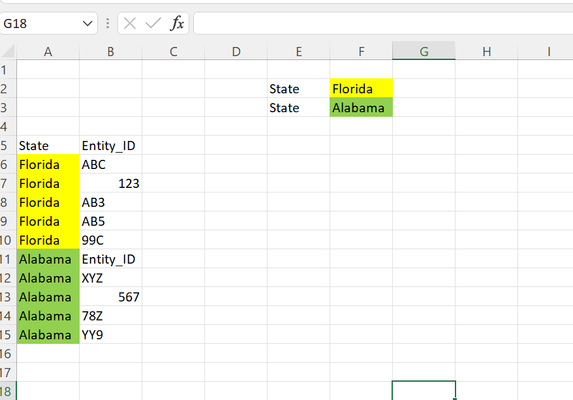
- Apr 08, 2022
For example:
Sub FillA()
    Dim r As Long
    Dim m As Long
    Dim s As String
    Application.ScreenUpdating = False
    s = Range("F2").Value
    m = Range("B" & Rows.Count).End(xlUp).Row
    For r = 6 To m
        If Range("B" & r).Value = "Entity_ID" Then
            s = Range("F3").Value
        End If
        Range("A" & r).Value = s
    Next r
    Application.ScreenUpdating = True
End Sub
You could also use a formula. In A6:
=IF(COUNTIF(B$6:B6,"Entity_ID"),$F$3,$F$2)
Double-click the fill handle of A6 to fill down.

For example:
Sub FillA()
    Dim r As Long
    Dim m As Long
    Dim s As String
    Application.ScreenUpdating = False
    s = Range("F2").Value
    m = Range("B" & Rows.Count).End(xlUp).Row
    For r = 6 To m
        If Range("B" & r).Value = "Entity_ID" Then
            s = Range("F3").Value
        End If
        Range("A" & r).Value = s
    Next r
    Application.ScreenUpdating = True
End Sub
You could also use a formula. In A6:
=IF(COUNTIF(B$6:B6,"Entity_ID"),$F$3,$F$2)
Double-click the fill handle of A6 to fill down.

- HansVogelaarApr 13, 2022MVP
Use this version of the macro:
Sub FillA() Dim r As Long Dim m As Long Dim t As Long Dim s As String Application.ScreenUpdating = False t = 2 s = Range("F" & t).Value m = Range("B" & Rows.Count).End(xlUp).Row For r = 6 To m If Range("B" & r).Value = "Entity_ID" Then t = t + 1 s = Range("F" & t).Value End If Range("A" & r).Value = s Next r Application.ScreenUpdating = True End Sub- csigmanApr 13, 2022Copper Contributor
HansVogelaar Thank you, I'm getting an error when I try to run the code (Run-time error 1004 Application defined or object defined error) at the line beginning with "For r". I did update the columns to align with the data locations and ensure the excel is macro enabled. Attached the excel I'm working in. I'm not sure what is causing it, do you have any ideas?
- HansVogelaarApr 13, 2022MVP
You attached a .xlsx workbook, so it wasn't macro-enabled.
The layout of the worksheet is different from that in your first post, so the macro has to be updated to match the layout.
See the attached .xlsm workbook.