Forum Discussion

justwork
Jan 14, 2020Copper Contributor
Disable Spill in vlookup
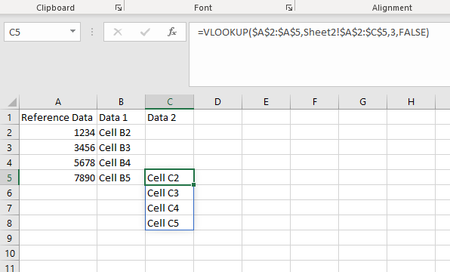
Is there a way to disable or turn off spill? Spill was introduced to my version of O365 Excel today and vlookup is failing to operate as it has prior to the update. In the image Sheet1 below I h...

Patrick2788
Jan 14, 2020Silver Contributor
This formula will spill:
=IFERROR(VLOOKUP(@$O$2:$O$997853,'KEY-Desc'!$B$1:$E$1000000,3,FALSE),"REMOVEME")
This won't:
=IFERROR(VLOOKUP(O2,'KEY-Desc'!$B$1:$E$1000000,3,FALSE),"REMOVEME")
Details on the @ being included:

justwork
Jan 14, 2020Copper Contributor
I have been playing around with a small data set and it seems to be working as expected now. As you can see row 17 and 22 are examples where its not spilling and I validated that the data is accurate. The whole issue I had revolves around wanting to copy the entire formula and paste it into a cell so it will run, this is now working as expected.