Forum Discussion

Disable Spill in vlookup
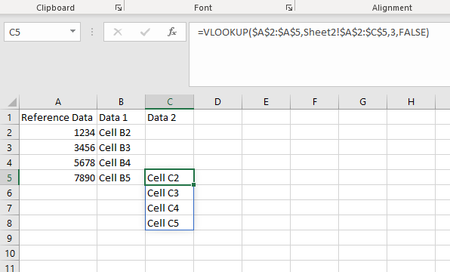

As I said this is a simplified example. I use vlookup to find the match in the range, the example shows how it does not return the result to the correct line like it used to (row 5 should have the value in row 5), now it just moves the lines like shown in row 8.
I opened my real work file in Excel just now and noticed a new pop up appear that wasn't there this morning telling me that "We've upgraded Excel's formula language and, as a result, you might notice the @ operator in some formulas. Your formulas will behave the same as they always have.". My formula now has the @ symbol as shown "=IFERROR(VLOOKUP(@$O$2:$O$997853,'KEY-Desc'!$B$1:$E$1000000,3,FALSE),"REMOVEME")" so maybe it will work. Were going to give it a try and see, I have no idea what the at symbol does as this is new to me today.

This formula will spill:
=IFERROR(VLOOKUP(@$O$2:$O$997853,'KEY-Desc'!$B$1:$E$1000000,3,FALSE),"REMOVEME")
This won't:
=IFERROR(VLOOKUP(O2,'KEY-Desc'!$B$1:$E$1000000,3,FALSE),"REMOVEME")
Details on the @ being included:
- justworkJan 14, 2020Copper Contributor
I have been playing around with a small data set and it seems to be working as expected now. As you can see row 17 and 22 are examples where its not spilling and I validated that the data is accurate. The whole issue I had revolves around wanting to copy the entire formula and paste it into a cell so it will run, this is now working as expected.