Forum Discussion

Dimension of Array variable inside LET FUNCTION does not match dimension of the Table assigned
- Jun 19, 2024
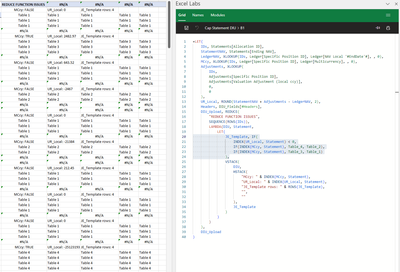
gfpcp All of the variables used in the JE_Template definition are array objects (UR_Local, MCcy and Statement). To prove this, temporarily use TYPE(UR_Local) or TYPE(MCcy) as the final calculation of your LET statement (in place of DIU_Upload)... the result will be 64 (type: array). As such, INDEX(MCcy,1) will return an array object containing a single value (e.g. {TRUE} instead of TRUE). The default behavior of the IF function when an array object is passed to the logical_test argument is as I described in my first response above.
To force an array containing a single logical value (Boolean) to return TRUE or FALSE (type 4) instead of {TRUE} or {FALSE} (type 64), use the implicit intersection operator (@). For example, try changing the definition of JE_Template as follows:
JE_Template, IF(
    @INDEX(UR_Local, Statement) < 0,
    IF(@INDEX(MCcy, Statement), Table_4, Table_2),
    IF(@INDEX(MCcy, Statement), Table_3, Table_1)
)
I hope that makes sense. Please see the attached sample workbook, if needed...


In addition to great djclements explanation, INDEX(MCcy, 1, 1) here works the same way as @INDEX(MCcy, 1), i.e. returns single value instead of one element array.
