Forum Discussion

jmatty2023
Dec 30, 2022Copper Contributor
Dialog box vanishes in Power Query Editor when trying to split columns
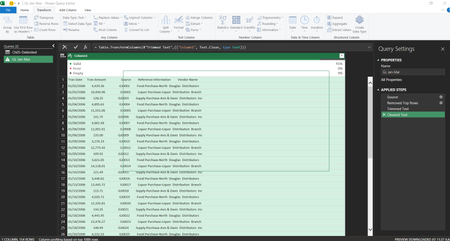
Hi I've got Excel 365 and trying to improve my power query skills for work and also for personal use as well hopefully. Anyway, not sure this is a bug or how to get around it if anyone can he...

jmatty2023
Dec 30, 2022Copper Contributor
I've found the problem (bug) now....
If I right-click on the column header > Split Column > by number of characters ..... then the problem happens.
However, if I go via the ribbon > Home > Split Column > by number of characters .... then it works absolutely fine which is the workaround.
If I right-click on the column header > Split Column > by number of characters ..... then the problem happens.
However, if I go via the ribbon > Home > Split Column > by number of characters .... then it works absolutely fine which is the workaround.
- SergeiBaklanDec 30, 2022Diamond Contributor
Not exactly. For this concrete case that could be the workaround. But this box could appear on any other operation, e.g. correcting of table merge. This is not specific to split columns.
- jmatty2023Dec 30, 2022Copper ContributorDo Microsoft have this kind of issue logged as a defect? I searched on the internet and its been an issue since at least MS Excel 2010 ?!?!?
https://answers.microsoft.com/en-us/msoffice/forum/all/dialogue-box-not-showing-in-excel-2010/9b2aaf7c-a283-4ffb-8eb9-0668b87f0fd3- SergeiBaklanJan 03, 2023Diamond Contributor
I believe an issue is on radar. At the same time I'm not sure it's easy to avoid such issue due to nature of PQ window for Excel. Anyway, it happens much more seldom than it was before. Issue in link you provided is bit different story.
Anyway, keep you on latest PQ for Excel.
