Forum Discussion

osmanmkc
Sep 12, 2021Copper Contributor
Delete multiple lines
Hi there! I use excel for the auctions I organize on the internet. Each line contains the features of a product. When an auction ends, I manually delete the sold products one by one and repost th...

HansVogelaar
Sep 12, 2021MVP
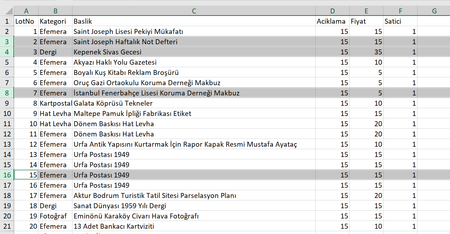
With the rows that you want to remove selected, as in your screenshot, right-click any of the selected row numbers on the left hand side, then select Delete from the context menu.

osmanmkc
Sep 12, 2021Copper Contributor
No, that's not what I was asking. This is my job. What I'm asking is how can I speed up the selection process. I have an excel file with 3000 lines and I want to delete 500 lines with specific line numbers from it, how can I speed up this process instead of selecting them one by one?
- HansVogelaarSep 12, 2021MVP
If you use an empty column in which you enter something, for example an "x" if the row is to be deleted, you can filter the data to display only the rows with an "x", delete the filtered rows in one go, then remove the filter.
Or do you have another way to specify which rows to delete?
 DevendraJainSep 13, 2021Iron ContributorYes if there any criteria on the basis of which you delete rows then we can automate that criteria
- DevendraJainSep 12, 2021Iron ContributorYou can create a one time macro for that and have a permanent solution for your problem. If you want I can help you with it please contact me personally on my mail jdevendra6509@gmail.com