Forum Discussion

olopa67
Mar 25, 2022Brass Contributor
Delete a table row if a file is not found anymore
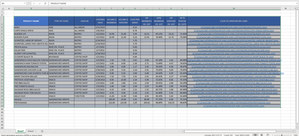
first of all huge thank you to all the member who helped me in accomplish my project, I m 99%done. what i need to complete is a way to delete the row from the below table if the the relative file is...
- Mar 26, 2022
You may try the following code to delete a table row if a recipe card doesn't exist. You may click the button in cell M1 in the attached to run the macro.
Sub DeleteTableRowIfFileDoesNotExist()
Dim ws              As Worksheet
Dim tbl             As ListObject
Dim fso             As Object
Dim i               As Long
Dim strFilePath     As String

Application.ScreenUpdating = False

Set ws = ThisWorkbook.Worksheets("Sheet1")
Set tbl = ws.ListObjects("Table1")
Set fso = CreateObject("Scripting.FileSystemObject")

For i = tbl.DataBodyRange.Rows.Count To 1 Step -1
    strFilePath = tbl.ListColumns("CLICK TO OPEN RECIPE CARD").DataBodyRange.Cells(i).Value
    If Not fso.fileexists(strFilePath) Then
        tbl.ListRows(i).Delete
    End If
Next i

Application.ScreenUpdating = True

End Sub

olopa67
Mar 26, 2022Brass Contributor
Subodh_Tiwari_sktneer thank you for taking the time to help,
here is the file.

Subodh_Tiwari_sktneer
Mar 26, 2022Silver Contributor
You may try the following code to delete a table row if a recipe card doesn't exist. You may click the button in cell M1 in the attached to run the macro.
Sub DeleteTableRowIfFileDoesNotExist()
Dim ws              As Worksheet
Dim tbl             As ListObject
Dim fso             As Object
Dim i               As Long
Dim strFilePath     As String

Application.ScreenUpdating = False

Set ws = ThisWorkbook.Worksheets("Sheet1")
Set tbl = ws.ListObjects("Table1")
Set fso = CreateObject("Scripting.FileSystemObject")

For i = tbl.DataBodyRange.Rows.Count To 1 Step -1
    strFilePath = tbl.ListColumns("CLICK TO OPEN RECIPE CARD").DataBodyRange.Cells(i).Value
    If Not fso.fileexists(strFilePath) Then
        tbl.ListRows(i).Delete
    End If
Next i

Application.ScreenUpdating = True

End Sub
- olopa67Mar 26, 2022Brass ContributorI have no words to express my gratitude Thank you so much it works perfectly
- Subodh_Tiwari_sktneerMar 26, 2022Silver Contributor