Forum Discussion

bartvana
Oct 24, 2021Iron Contributor
Decision table (without nested IFs or Power Query)
I have a decision table (https://en.wikipedia.org/wiki/Decision_table) that I would like to use in Excel. I know how to implement it using nested IFs or Power Query, but is there a simple and effic...

bartvana
Oct 24, 2021Iron Contributor
Yes, of course.
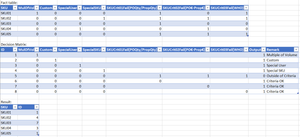
The decision table reads like this:
- if MulOfVol = 1, then ID 1 (the other parameters are irrelevant in this row, that's why they are empty)
- if MulOfVol = 0 and Custom = 1, then ID 2
- ...
- if SKUCrit01Fail = 1 and SKUCrit02Fail = 1 and SKUCrit03Fail = 1, then ID 5
Based on the fact table, I need to fill in the corresponding decision ID for each SKU.
(I just noticed an error in my decision table, corrected file attached, I'll also correct my initial post).
So SKU1 gets decision ID 1 because MulOfVol = 1.
SKU03 gets decision ID 7 because its parameters correspond with this row (where empty fields are irrelevant).

Riny_van_Eekelen
Oct 24, 2021Platinum Contributor
bartvana I gladly leave it to someone else.