Forum Discussion

DAX Count with MIN Date
- Nov 16, 2023
As variant for
assuming no other filters
Oldest Case:=MIN( 'Table'[Date] )

Weeks behind:=INT( (TODAY() - MIN( 'Table'[Date] ) )/7 )

In Queue:=VAR minDate=MIN( 'Table'[Date] )
RETURN COUNTROWS( FILTER( 'Table', 'Table'[Date] = minDate) )


Hi mouzzampk
#1 Count Serial Number based on MIN date
If you have duplicates and want to count them:
=VAR MinOfAllDates =
    CALCULATE (
        MIN ( 'Table'[Date] ),
        ALL ( 'Table'[Serial] )
    )
RETURN
CALCULATE(
  COUNT( 'Table'[Serial] ),
  FILTER (
      ALL ( 'Table' ),
      'Table'[Date] = MinOfAllDates
  )
)
If you don't want to count potential duplicates: same as above after replacing COUNT with DISTINCTCOUNT
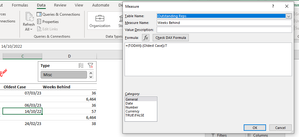
#2 And in Weeks Behind is it possible to show blank field if Oldest Case don't have any date? I am not sure why I am seeing 6,464
Numeric value of TODAY(): 45,246
Numeric value of a blank in calc.: 0
(45,246 - 0) / 7 = 6,463.714286 (rounded up = 6,464)
Difficult to say for sure with your picture only but try the following:
=IF(
  ISBLANK([Oldest Case]),
  BLANK(),
  DIVIDE( (TODAY() - [Oldest Case]), 7)
)
If that doesn't work share your workbook (remove sensitive info.) please

Lorenzo Thank you so much
Part 2 is fixed but In Queue seem like not outputting correct. I have 2 serial numbers for 24/10/2023 but only one is showing. I have used COUNTX not the top one.
- SergeiBaklanNov 16, 2023Diamond Contributor
As variant for
assuming no other filters
Oldest Case:=MIN( 'Table'[Date] ) Weeks behind:=INT( (TODAY() - MIN( 'Table'[Date] ) )/7 ) In Queue:=VAR minDate=MIN( 'Table'[Date] ) RETURN COUNTROWS( FILTER( 'Table', 'Table'[Date] = minDate) )- mouzzampkNov 16, 2023Copper Contributor
This works awesome
In Queue:=VAR minDate=MIN( 'Table'[Date] )
RETURN COUNTROWS( FILTER( 'Table', 'Table'[Date] = minDate) )But for this one I am getting 6,463 when Oldest Field is empty.
- mouzzampkNov 16, 2023Copper Contributor
Thanks SergeiBaklan I combined your formula with Lorenzo and its working perfectly fine.
=IF(ISBLANK([Oldest Case]),BLANK(),INT( (TODAY() - MIN( 'Outstanding Reps'[Date] ) )/7 ) )Thank you
- LorenzoNov 16, 2023Silver Contributor
In Queue seem like not outputting correct. I have 2 serial numbers for 24/10/2023 but only one is showing
Can't determine the cause with a picture only. Please attach your workbook or if you're not allowed upload and share it on OneDrive, Google Drive... and post the shared link here please