Forum Discussion

bartvana
Mar 24, 2022Iron Contributor
DAX Calculate Sum with Filter
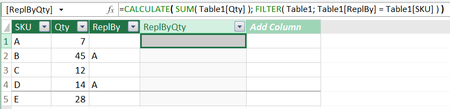
I would expect in the below example that in the column "ReplByQty", the first row would be 45 + 14 = 59. What am I doing wrong? Attached the sample workbook.
- Mar 24, 2022
That is
=VAR currentSKU=Table1[SKU]
RETURN CALCULATE( SUM( Table1[Qty] ),
       FILTER( Table1, Table1[ReplBy] = currentSKU ) )
Variable is evaluating first and fixed in Returned formula

SergeiBaklan
Mar 24, 2022Diamond Contributor
That is
=VAR currentSKU=Table1[SKU]
RETURN CALCULATE( SUM( Table1[Qty] ),
       FILTER( Table1, Table1[ReplBy] = currentSKU ) )
Variable is evaluating first and fixed in Returned formula
 bartvanaMar 24, 2022Iron Contributor
SergeiBaklan Fabulous, thank you!
Just for my understanding, why doesn't it work without the variable?
- SergeiBaklanMar 24, 2022Diamond Contributor
bartvana , you are welcome.
In brief, you fix current row content for scanning the table evaluating formula, without that it is not fixed. It's much better is explained here
Solved: Explanation of the EARLIER formula - Microsoft Power BI Community
EARLIER function (DAX) - DAX | Microsoft Docs
Old Earlier worked practically the same way as now VAR.
- bartvanaMar 24, 2022Iron Contributor
SergeiBaklan OK, thank you!