Forum Discussion

Dates won't format
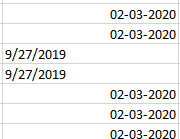

Is it possible for you to post a copy of the spreadsheet itself? That would help us help you better than a description, especially given all the things you've already tried.

Thanks. hope you can help.
Here it is, I have removed some data that is not relevant. As you can see I also have problems with ',' and '.' in regular numbers. Easier to fix with find and replace. Still don't get it why some are formated correctly and some are not.
- SergeiBaklanJan 21, 2021Diamond Contributor
That is fixed by Text to Columns as above
- Felicia400Jan 21, 2021Copper Contributor
What? That is absolutely crazy. Would have never guessed that the solution is choosing a different format than the one you want. Thank you so much. You have saved my sanity!
- SergeiBaklanJan 21, 2021Diamond Contributor
Felicia400 , you are welcome.
Dates in Excel are actually numbers which are presented in human friendly date format. If you have text, which is looks like date, applying any format to it won't convert such text to number. That's what Text to Columns does. You say to it on third step - look, I have the text which presents the date in MDY format and which shall be considered as date. Based on such instruction Excel converts such texts in the columns into dates (aka numbers which will be shown in your default date format) and ignores all other values.
Please be careful with default transforming. If, for example, you open csv file with 02/03/2021 value (actually text) Excel could convert into 2nd of Mar or 3rd of Feb depends on your locale default format. You shall to check such default transformations to be sure Excel correctly recognized the dates.
