Forum Discussion

Dates Formatting
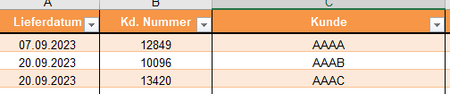
 Sep 20, 2023
In Power Query, you can filter delivery dates by customer number and automatically calculate departure dates by subtracting 7 days. Begin by loading your delivery date data into Power Query. Then, create a custom column that filters based on the customer number and subtracts 7 days from the delivery date. To do this,
use the "Add Custom Column" option in Power Query, and write a formula like: = Table.AddColumn(#"PreviousStep", "Departure Date", each if [Customer Number] = YourCustomerNumber then Date.AddDays([Delivery Date], -7) else [Delivery Date]). Replace YourCustomerNumber with the specific customer number for which you want to https://uk49spredictions.com/ departure dates.
In Power Query, you can filter delivery dates by customer number and automatically calculate departure dates by subtracting 7 days. Begin by loading your delivery date data into Power Query. Then, create a custom column that filters based on the customer number and subtracts 7 days from the delivery date. To do this,
use the "Add Custom Column" option in Power Query, and write a formula like: = Table.AddColumn(#"PreviousStep", "Departure Date", each if [Customer Number] = YourCustomerNumber then Date.AddDays([Delivery Date], -7) else [Delivery Date]). Replace YourCustomerNumber with the specific customer number for which you want to https://uk49spredictions.com/ departure dates.
