Forum Discussion

ameyad09
Feb 25, 2024Copper Contributor
Date Field showing as text due to the '-' hyphens present in the field.
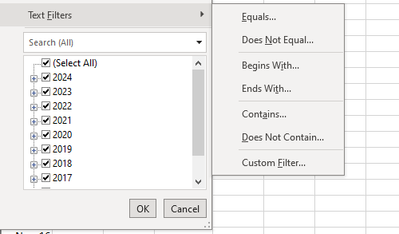
So ,I have a date field in date format (Jan-17) and when I filter on that field it keeps showing Text Filters as below instead of date Requirement is to get Date Filters as below : ...

ameyad09
Feb 26, 2024Copper Contributor
I tried this,however getting message No cells were found for the entire column.
Is there any way to handle the hyphens to show as date using any formula?
Thanks.
Is there any way to handle the hyphens to show as date using any formula?
Thanks.

JKPieterse
Feb 26, 2024Silver Contributor
Alternatively, do a Find and Replace and replace - with nothing (check the "Match entire cell contents" box)
- ameyad09Feb 26, 2024Copper ContributorHi,I tried this and it seems to work ,however as this data is exported via ,it will be a manual process.
Also, is this true that Excel consider date column as text if the number of blank values are more than the date values?
I tried using format cells to show as date but it still shows as Text.- JKPieterseFeb 27, 2024Silver Contributor
Rather than doing this manually each time, you are better off using a different method of pulling in the data. Have a look at the Data tab, there are options there to pull in your data from a plethora of different sources. Once you have your data in from the source it becomes very easy to record steps to do cleanup, like removing records which only contain a - or empty records. Finally you can set the data types of all columns as you need them and after that you can choose to push the results to a table on an Excel worksheet. If you create your pivot table using that new table as its source (or you can push the query result in a pivot directly!), you should never have an issue with dates again.