Forum Discussion

(Dataverse) Selective Power query?
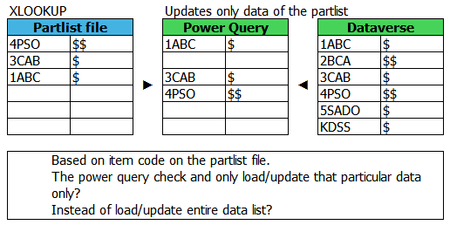
- May 07, 2024
You may filter on partlist
as
let
    Result = Table.SelectRows(Source, each List.Contains( Partlist[ID], [ID]  ))
in
    Result

You may filter on partlist
as
let
    Result = Table.SelectRows(Source, each List.Contains( Partlist[ID], [ID]  ))
in
    Result
If I may ask, where do I insert the above code?
- SergeiBaklanMay 07, 2024Diamond Contributor
In Power Query editor you may open Advanced Editor to modify M-script code, or for the concrete step you may modify the code in formula bar of the PQ editor.
- Sunbed1060May 08, 2024Copper Contributor
Thank you SergeiBaklan ,
It is working as well 🙂
For the table name for Partlist, can it be dynamic?
As of right now, we are using the partlist excel file as teams template file that can be used by other users.
And table name tends to get messy.- SergeiBaklanMay 09, 2024Diamond Contributor
It could be, but it depends on which logic do you use to select this or that partlist table.
As variant that name of the file/table could be defined in the cell of Excel file which we could read by Power Query and use as parameter. Lot of samples, e.g.
Building a Parameter Table for Power Query (excelguru.ca)