Forum Discussion

Data Validation Questions.
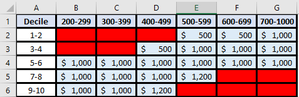

dmissel23 data validation for the first 3 parts:
=(B2>=300)*(B2<=8000)*(INT(B2)=B2)
as for the blank warning maybe make that a notification on selection.
attached is an example (but used max 3000 accidentally)
 dmissel23Jan 05, 2022Copper Contributor
Thanks mtarler! Do you know of a formula that I could apply to the same range that would only impact blank cells? And if so, is it possible to combine it with the formula you provided me?
If I apply the message box to just the specific red cells in each table, we have some instances where we would need to change a cell from red to grey and enter a value in it and when we do, it sounds like we would have to go back into the cell after a value has been entered and remove the validation from the cell that originally was put in place when it was blank (red).
I was hoping we could assign a formula so that after a value has been entered in a red cell, excel would recognize the value so no message box appears in the future when you click on the cell that had the value added.
Thanks for your help!
- mtarlerJan 05, 2022Silver ContributorI do not believe you can detect what the value is before the update using data validation. You can use conditional formatting to automatically highlight blank cells red and then after you enter a value it can automatically clear the highlighting. Another problem is that even if data validation is used you would need it to be 'warning' if it was blank but 'alert' if it is out of bounds which you also can't do. You can do this using VBA if it is so important.