Forum Discussion

HanyBaghdady
Feb 18, 2023Copper Contributor
Data Validation list value update after data list edit.
How to get my drop down data value to update if the value on the data validation list got edited ? kindly refer to image for clarification. Thank you.
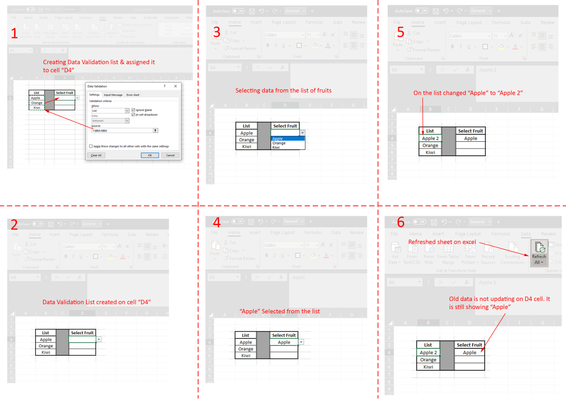
- Feb 18, 2023
This requires VBA code, with some side effects:
- Users will have to allow macros.
- It won't work in Excel Online, nor on iOS or Android.
- If you change a cell in the list, Undo will be disabled.
- After changing a cell in the list, Excel will jump back to that cell.
In the attached demo workbook, I have named the source range List, and I have selected all cells that have data validation based on this range, and assigned that range the name DVCells.
I right-clicked the sheet tab and selected 'View Code'.
I copied the following code into the worksheet module:
Private Sub Worksheet_Change(ByVal Target As Range)
    Dim Src As Range
    Dim OldVal, NewVal
    If Intersect(Range("List"), Target) Is Nothing Then Exit Sub
    Application.ScreenUpdating = False
    Application.EnableEvents = False
    If Intersect(Range("List"), Target).Count > 1 Then
        MsgBox "Do not change multiple cells in the list at once!", vbCritical
        Application.Undo
        GoTo ExitHere
    End If
    Set src=Intersect(Range("List"), Target)
    NewVal = Src.Value
    Application.Undo
    OldVal = Src.Value
    Src.Value = NewVal
    If OldVal <> "" Then
        Range("DVCells").Replace What:=OldVal, Replacement:=NewVal, LookAt:=xlWhole
    End If
ExitHere:
    Application.EnableEvents = True
    Application.ScreenUpdating = True
End Sub
I switched back to Excel and saved the workbook as a macro-enabled workbook (*.xlsm).

ross111275
Apr 04, 2024Copper Contributor
Thanks for your help
One issue I can't resolve.
When I have one primary list (List 1) and I want it to change multiple Data Validation Lists (DVCells2 and DVCells3 etc.)on different pages - why can't I simply place multiple calls to DVUpdate in the page where the primary list exists
e.g.:
Private Sub Worksheet_Change(ByVal Target As Range)
Call UpdateDV("List1", "DVCells2", Target)
Call UpdateDV("List1", "DVCells3", Target)
End Sub
Debug says it hangs on Application.Undo
Sorry to bother youa gain. MAny thanks
Ross
One issue I can't resolve.
When I have one primary list (List 1) and I want it to change multiple Data Validation Lists (DVCells2 and DVCells3 etc.)on different pages - why can't I simply place multiple calls to DVUpdate in the page where the primary list exists
e.g.:
Private Sub Worksheet_Change(ByVal Target As Range)
Call UpdateDV("List1", "DVCells2", Target)
Call UpdateDV("List1", "DVCells3", Target)
End Sub
Debug says it hangs on Application.Undo
Sorry to bother youa gain. MAny thanks
Ross

HansVogelaar
Apr 04, 2024MVP
Since you asked for different validation ranges for each list, I didn't take into account that you'd have multiple validation ranges with the same source list. The code has to be modified again...
- ross111275Apr 05, 2024Copper ContributorMany thanks. I'm sure many will benefit from your work. Much appreciated.
All the best