Forum Discussion

Data model conversion-Power Query
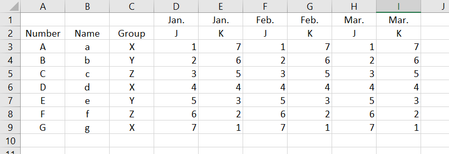

Hi Victoria-9 ,
Initial idea of how to work with multi-row headers is from Gil Raviv, at least I picked-up it here. Now don't remember there are the details, in his book or blog. In brief, transformation is like
generated script is
let
    Source = Excel.CurrentWorkbook(){[Name="Table2"]}[Content],
    MergeFirstThreeColumns = Table.CombineColumns(Source,
        {"Column1", "Column2", "Column3"},
        Combiner.CombineTextByDelimiter("=", QuoteStyle.None),"Merged"),
    TransposeTable = Table.Transpose(MergeFirstThreeColumns),
    FirstRowAsHeader = Table.PromoteHeaders(TransposeTable, [PromoteAllScalars=true]),
    UnpivoteOtherThanFirstTwoColumns = Table.UnpivotOtherColumns(FirstRowAsHeader,
        {"==", "Number=Name=Group"}, "Attribute", "Value"),
    PivotMonths = Table.Pivot(UnpivoteOtherThanFirstTwoColumns,
        List.Distinct(UnpivoteOtherThanFirstTwoColumns[#"Number=Name=Group"]),
        "Number=Name=Group", "Value"),
    SplitFirstColumnsBack = Table.SplitColumn(PivotMonths, "Attribute",
        Splitter.SplitTextByDelimiter("=", QuoteStyle.Csv), {"Attribute.1", "Attribute.2", "Attribute.3"}),
    RenameAsBefore = Table.RenameColumns(SplitFirstColumnsBack,
        {{"==", "  "}, {"Attribute.1", "Number"}, {"Attribute.2", "Name"}, {"Attribute.3", "Group"}}),
    ProperColumnsOrder = Table.ReorderColumns(RenameAsBefore,{"Number", "Name", "Group", "J", "K", "  "})
in
    ProperColumnsOrder
and file is attached.
Hope above are self-explained if repeat step by step. Didn't play with final sorting, recognised too late it's better to do one.
 Victoria-9Mar 25, 2019Copper Contributor
Hi SergeiBaklan
Thank you very much!
I followed your steps to change the information and tried it. I have succeeded! But I made a mistake in my question.
The value contained in the 'Number' column should be ‘123456’ instead of ‘a123’. After replacing the ‘number’ with ‘letter + number’ in my table , I succeeded.
Do you know how to modify the step if the number column is all numeric?
- SergeiBaklanMar 25, 2019Diamond Contributor
Victoria-9 , in addition I added months sorting by adding month number in front of each its name before pivoting; removed that index on latest steps.
- SergeiBaklanMar 25, 2019Diamond Contributor
Hi Victoria-9 ,
In Power Query editor you may convert column [Number] to type text on one of the first steps, and on one of the last one convert it back to Whole Number, please see attached. Columns combiner works with texts only.