Forum Discussion

Data model conversion-Power Query
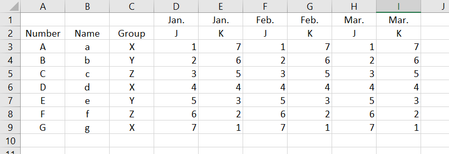

I do not think tables or PQ are really intended to deal with two levels of heading. If you treat the J and K columns as two separate tables (this can be achieved within PQ by deleting columns). Then unpivot each using 'other columns' with Number, Name and Group selected to get two tables of the form you require and save each as a connection only.
Then, starting with the first table, merge the second using Number, Name, Group and Month from each as key fields for the join. Finally expand the second table extracting the value field only.

Thanks for the way you provide, I will try it. Before, I saw a way to process this data using PQ in the same table, perhaps changing the title form, but I forgot,I will continue to look for.
Thanks very much for your help.
- PeterBartholomew1Mar 20, 2019Silver Contributor
I think I have found A way of doing what you want without splitting the table into two. I won't claim it is THE way because I am just working by trial and error!
If you create single level headers by manually concatenating the J/K with the month (a space will do as a separator) and then unpivot, you get a table twice as long as you want. If you then split the compound column into its letter and date parts, you can (re)pivot on the new letter column to give the J and K output in separate columns.
I am not sure whether this helps you but I am learning!