Forum Discussion

george1685
Mar 16, 2022Copper Contributor
Data entry
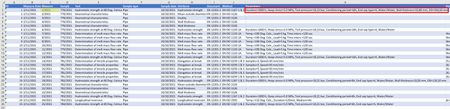
Hi, I have a datasheet with measuring data named “Measures” Each measure, among other, contains a “Parameters” field as you can see in the following screenshot. The “Parameters” field is a s...

HansVogelaar
Mar 16, 2022MVP
In K2:
=TEXTJOIN(", ";TRUE;IF(Params!$A$2:$A$1000=C2;Params!$B$2:$B$1000&" "&Params!$C$2:$C$1000&" "&Params!$D$2:$D$1000;""))
If the Params sheet has more than 1000 rows of data, adjust the ranges in the formula accordingly.
Then fill down.

george1685
Mar 17, 2022Copper Contributor
Hi,
Thank you for the tip however this is not what I am looking for.
I need an efficient way to enter data into the 'Params" datasheet while viewing the "Measures" datasheet, there is a connection between the two tables using the "Measure" field (the yellow highlighted)
Thank you for the tip however this is not what I am looking for.
I need an efficient way to enter data into the 'Params" datasheet while viewing the "Measures" datasheet, there is a connection between the two tables using the "Measure" field (the yellow highlighted)
- PeterBartholomew1Mar 17, 2022Silver ContributorMaybe creating a data type within Power Query would do what you want?
- george1685Mar 17, 2022Copper ContributorI am not experienced using Power Query and there are many online courses on this topic.
I cannot decide if any of these fit to my needs.
Any link to specific resource for the above will be greatly appreciated.
