Forum Discussion

Cross Reference with variable data
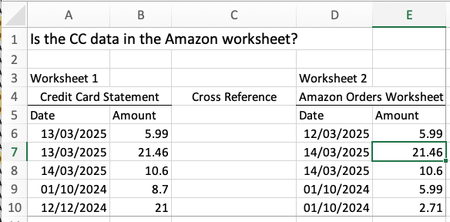

Would suggest:
1. Use Helper Columns for Date Range
In both sheets, create helper columns to account for the possible date range (+/- 1 day):
- In Sheet 1 (Credit Card Statement):
- Add a "Min Date" column = =A2-1 (if your date is in column A).
- Add a "Max Date" column = =A2+1.
- In Sheet 2 (Amazon Purchase List), leave your dates as they are.
2. Combine Amounts and Dates
In both sheets, create a concatenated "Key" column that combines the amount and date range for better matching:
=TEXT(B2,"0.00")&"|"&TEXT(C2,"YYYY-MM-DD")&"|"&TEXT(D2,"YYYY-MM-DD")- Replace B2 with the "Amount", C2 with "Min Date", and D2 with "Max Date".'
- In Sheet 2: Create a key using the amount and transaction date:
=TEXT(B2,"0.00")&"|"&TEXT(C2,"YYYY-MM-DD")
3. Cross-Reference with a Formula
Now, in Sheet 1, check for matches using an ARRAYFORMULA or nested conditions:
=IF(SUMPRODUCT((Sheet2!B$2:B$1000=Sheet1!B2)*(Sheet2!C$2:C$1000>=Sheet1!C2)*(Sheet2!C$2:C$1000<=Sheet1!D2)) > 0, "YES", "NO")
- This formula checks whether any amount from Sheet 2 matches the amount in Sheet 1 and falls within the date range.
4. Simplify with a Pivot Table
If the logic seems too complex to manage, you can create a pivot table with aggregated data for each month. This will let you visually compare amounts without duplicating rows.

What is the reason for the key columns? In the above you never use them? If in Sheet 1 B=amount C=Min date D=Max Date then key is column E. If in Sheet2 B=Amounts and C=Dates then key =D