Forum Discussion

Creating a dynamic repeating sequence of arrays
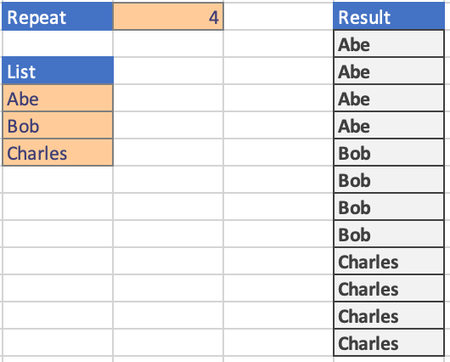
- May 20, 2022
ElRafaVaz33 There are lots of possibilities. Here is one:
=LET(in,F1:F6,rep,G1,s,SEQUENCE(ROWS(in)*rep,1,0),INDEX(in,QUOTIENT(s,rep)+1))

farmerjenna Patrick2788 gave a clever solution above but w/r to the original formula you can tweak it like this:
=LET(in,F1:F6,rep,G1,
     s,SEQUENCE(ROWS(in)*rep,1,0),
     INDEX(in,MOD(s-1,rep)+1))
so basically instead of using QUOTIENT which will give the integer value after dividing the number of rep (i.e. 1,1,1,2,2,2,3,3,3) I changed it to use MOD which will give the remainder after dividing so it gives (0,1,2,0,1,2,0,1,2) and then +1 to get index 1,2,3...
another option using a variation on Patrick2788 's first answer is:
=TOCOL(CHOOSE(SEQUENCE(1,6,1,0),A1:A3),,1)in this case that very last 1 can be a 0 to create a,a,a,b,b,b,c,c,c or a 1 to make it a,b,c,a,b,c,...
btw the "6" is the number of repeates and the A1:A3 is the input range and this assumes a 'column' and if you have a row of input you probably have to swap the (1,6,1,0) to be (6,1,1,0)
In Patrick's actual version he used CHOOSECOLS so that would just get swapped with CHOOSEROWS
as I mentioned, lots of options 🙂

D2#: =LET(a;A3:A5;b;B1;INDEX(a;SEQUENZ(ZEILEN(a)*b;;;1/b))) deutsch
D2#: =LET(a,A3:A5,b,B1,INDEX(a,SEQUENCE(ROWS(a)*b,,,1/b))) english (US)
makes it variable only on A3:A5 (and implicitly its count) and B1