Forum Discussion
Creating a dynamic repeating sequence of arrays
- May 20, 2022
ElRafaVaz33 There are lots of possibilities. Here is one:
=LET(in,F1:F6,rep,G1,s,SEQUENCE(ROWS(in)*rep,1,0),INDEX(in,QUOTIENT(s,rep)+1))
mtarler I've been trying to wrap my head around the LET function for this application. What if the OP wanted the list to repeat in an ABCABCABC fashion instead of AAABBBCCC?
- OliverScheurichMay 01, 2023Gold Contributor
=TOCOL(MAKEARRAY(ROWS(A1:A3),6,LAMBDA(r,c,INDEX(A1:A3,r))),,1)Another alternative could be LAMBDA with MAKEARRAY. Range A1:A3 has values A, B and C in this example. 6 is the number of repeats in this example.
- mtarlerMar 23, 2023Silver Contributor
farmerjenna Patrick2788 gave a clever solution above but w/r to the original formula you can tweak it like this:
=LET(in,F1:F6,rep,G1, s,SEQUENCE(ROWS(in)*rep,1,0), INDEX(in,MOD(s-1,rep)+1))so basically instead of using QUOTIENT which will give the integer value after dividing the number of rep (i.e. 1,1,1,2,2,2,3,3,3) I changed it to use MOD which will give the remainder after dividing so it gives (0,1,2,0,1,2,0,1,2) and then +1 to get index 1,2,3...
another option using a variation on Patrick2788 's first answer is:
=TOCOL(CHOOSE(SEQUENCE(1,6,1,0),A1:A3),,1)in this case that very last 1 can be a 0 to create a,a,a,b,b,b,c,c,c or a 1 to make it a,b,c,a,b,c,...
btw the "6" is the number of repeates and the A1:A3 is the input range and this assumes a 'column' and if you have a row of input you probably have to swap the (1,6,1,0) to be (6,1,1,0)
In Patrick's actual version he used CHOOSECOLS so that would just get swapped with CHOOSEROWS
as I mentioned, lots of options 🙂
- fsdeslogeFeb 09, 2024Copper ContributorBeautiful - simple & easy to understand.
- djclementsFeb 09, 2024Silver Contributor
fsdesloge and ElRafaVaz33 With the functions now available in Excel for MS365, this can simply be achieved with TOCOL, IF and SEQUENCE:
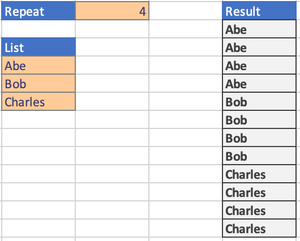
=TOCOL(IF(SEQUENCE(,B1), A4:A6))For a full explanation of this method, please see: https://techcommunity.microsoft.com/t5/excel/copy-array-n-times-with-excel-formula/m-p/4033181#M217814
- lupo1Apr 29, 2023Copper Contributor
D2#: =LET(a;A3:A5;b;B1;INDEX(a;SEQUENZ(ZEILEN(a)*b;;;1/b))) deutsch
D2#: =LET(a,A3:A5,b,B1,INDEX(a,SEQUENCE(ROWS(a)*b,,,1/b))) english (US)
makes it variable only on A3:A5 (and implicitly its count) and B1