Forum Discussion

denverlawyer
Mar 30, 2021Copper Contributor
Create a "Total" field for an auto populating list
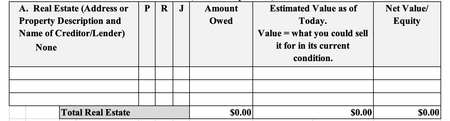
I'm trying to create an excel form that pulls a list of entries from an Object in Salesforce and automatically adds the value of each item in the list to create a total field. Problem is, the number...

HansVogelaar
Mar 30, 2021MVP
One option is:
- Remove the current total row.
- Convert the data range (including the header row) to a table.
- Tick the check box 'Table Row' for the table (on the Design tab of the ribbon, under Table Tools).

denverlawyer
Mar 30, 2021Copper Contributor
Thanks Hans. I tried your solution and for some reason it won't let me use the Define Names function to insert the fields from Salesforce. It seems like as soon as I try and use that function to insert the appropriate field label, Excel deletes it the cell reverts back to blank. Is there a trick to inserting fields into the cell of a Table?
- HansVogelaarMar 30, 2021MVP
denverlawyer Try another method then:
Insert an empty row between the data and the total row.
Include the empty row in the SUM formulas, but always insert new rows above that empty row.