Forum Discussion

Create a Power query or Dax to find Open Status more than 1 hour
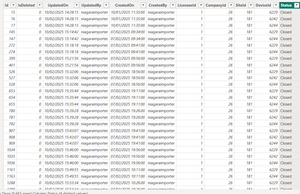
- Feb 14, 2025
With Power Query that could be like
let Source = Csv.Document(File.Contents("C:\Test\Door.csv"),[Delimiter=",", Columns=12, Encoding=1252, QuoteStyle=QuoteStyle.None]), PromotHeaders = Table.PromoteHeaders(Source, [PromoteAllScalars=true]), SelectColumns = Table.SelectColumns( PromotHeaders, {"DeviceId", "CreatedOn", "Status"}), TrueToOpen = Table.ReplaceValue(SelectColumns,"true","Open",Replacer.ReplaceText,{"Status"}), FalseToClosed = Table.ReplaceValue(TrueToOpen,"false","Closed",Replacer.ReplaceText,{"Status"}), DeclareType = Table.TransformColumnTypes( FalseToClosed, { {"DeviceId", Int64.Type} , {"CreatedOn", type datetime} }), #"Grouped Rows" = Table.Group( DeclareType, {"DeviceId"}, { {"Data", each [ tbl = _, //// Buffer = Table.Buffer( Table.Sort(tbl,{{"CreatedOn", Order.Ascending}}) ), Created = Table.Column( Buffer, "CreatedOn" ), Status = Table.Column( Buffer, "Status" ), SumTime = List.Generate( () => [TM = 0 , nRow = 0 ], each [nRow] < List.Count(Created), each [ TM = if Status{[nRow]} = "Closed" then 0 else [TM] + Duration.TotalMinutes( Created{[nRow]+1} - Created{[nRow] } ) , nRow = [nRow] + 1 ], each [TM] ), ExpandTable = Table.FromColumns( Table.ToColumns(Buffer) & {SumTime}, Table.ColumnNames(Buffer) & {"OpenMinutes"} ), MinutesType = Table.TransformColumnTypes( ExpandTable, {{"OpenMinutes", Int64.Type}}) ][MinutesType] } ///// }), AddOpenInMinutes = Table.ExpandTableColumn( #"Grouped Rows", "Data", {"CreatedOn", "Status", "OpenMinutes"}, {"CreatedOn", "Status", "OpenMinutes"}), ChangeType = Table.TransformColumnTypes( AddOpenInMinutes, { {"CreatedOn", type datetime} , {"Status", type text} , {"OpenMinutes", Int64.Type} }), FixInMemory = Table.AddIndexColumn(ChangeType, "Index", 0, 1, Int64.Type), SortTable = Table.Sort( FixInMemory, { {"DeviceId", Order.Ascending} , {"CreatedOn", Order.Ascending} }), RemoveIndex = Table.RemoveColumns(SortTable,{"Index"}) in RemoveIndex- source is exported from your model to csv (attached)
- above is done in Excel (attached)
- On first Closed after Open we add minutes, after that reset them

Excellove15 , thank you.
List.Generate - that's known pattern used, for example, to calculate Running Total. These days it's hard to generate something actually new, you always could find the pattern closed to your needs, modify and use it.
Power Query - I'm not sure on which level you are. Perhaps more universal resource is BI Gorilla by Rick de Groot. From scratch you may start from What is Power Query: A Beginner's Guide [2024], at these page Best Resources to Learn Power BI in 2024 (incl DAX, M) other valuable resources. Documentation is under Power Query M formula language reference - PowerQuery M | Microsoft Learn and in more details at Rick's resource Power Query How - Home of the M Language . As next step select one or two resources mentioned in above and subscribe on blogs, it always something useful appear.
Endorsement - these activities for me hobby, not business, I'm not looking for popularity. Your "thank you" if I was able to help is enough. On LinkedIn I'm not active. my profile, if you are interesting, https://www.linkedin.com/in/baklan/

Hi SergeiBaklan Sir,
Many thanks sir!😊
It means a lot to me! I have marked this as best solution
I have followed you on Linkedin sir. Also i have taken note of these study links and i will study. Your guidance means a lot to me.
Many thanks Sir!