Forum Discussion

DW1
Jan 10, 2025Copper Contributor
Counting worked hours in a timeslot
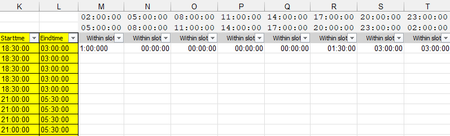
Hi All, Looking to calculate how many hours a person has worked within set of parameters to determine how many FTE there are available within three hour timeslots. So if column K and L have the ...

Patrick2788
Jan 12, 2025Silver Contributor
This one is a challenge for a few reasons:
- Excel does not support nested arrays, so the solution is not elegant (It will surely get me in trouble with the 'LET police'!).
- The Start/End times for shifts and time slots have some overnight occurrences.
I defined a few name items and created a function to handle the task. I did not assume the shifts and time slots would always be 8.5 and 3 hours, respectively:
// --- Workbook module ---

//Total rows and columns in the grid (not including headers)
i = ROWS(StartTime);
j = COLUMNS(Slot_Start);

//Determine total number of hours worked in a given shift.
//Take into account overnight hours.
shift = IF(StartTime > EndTime, (EndTime + 1) - StartTime, EndTime - StartTime) *
        24;
//Determine total number of hours in a given time slot.
//Take into account overnight hours.
slot = IF(
        Slot_Start > Slot_End,
        (Slot_End + 1) - Slot_Start,
        Slot_End - Slot_Start
    ) * 24;

//Function to be used in MAKEARRAY.
//For each element in the 'grid' determine the array of times
//in 30 minute increments vs. the array of times in a given time slot
//also in 30 minute increments.  Sum the total matches. TEXT is used to
//prevent misses from slight differences in decimals vs times.

WorkedHoursλ = LAMBDA(r, c,
        LET(
            start_y, INDEX(StartTime, r),
            hrs_y, @INDEX(shift, r),
            y, SEQUENCE(hrs_y * 2, , start_y, 0.5 / 24),
            y_arr, IF(y > 1, y - INT(y), y),
            slot_x, INDEX(Slot_Start, , c),
            hrs_x, @INDEX(slot, , c),
            x, SEQUENCE(hrs_x * 2, , slot_x, 0.5 / 24),
            x_arr, IF(x > 1, x - INT(x), x),
            check, SUM(N(ISNUMBER(XMATCH(TEXT(x_arr, "hh:mm"), TEXT(y_arr, "hh:mm"))))) *
                0.5 / 24,
            check
        )
    )
At the sheet level it looks like this:

PeterBartholomew1
Jan 13, 2025Silver Contributor
Strange, but it is so much easier working with day shifts. I can't help thinking I must be missing something simple!
=MAPλ(startDayShift, endDayShift,
    LAMBDA(s, e,
        LET(
            slot, DROP(Slot_End,,-1),
            end,  SORT(HSTACK(e, slot), , , TRUE),
            strt, SORT(HSTACK(s, slot), , , TRUE),
            end - strt
        )
    )
)
- Patrick2788Jan 13, 2025Silver Contributor
I can't help thinking there's an elegant solution in there somewhere with FREQUENCY but the PM to AM shifts throws a wrench in that!