Forum Discussion

Counting worked hours in a timeslot
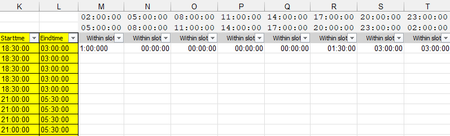

This one is a challenge for a few reasons:
- Excel does not support nested arrays, so the solution is not elegant (It will surely get me in trouble with the 'LET police'!).
- The Start/End times for shifts and time slots have some overnight occurrences.
I defined a few name items and created a function to handle the task. I did not assume the shifts and time slots would always be 8.5 and 3 hours, respectively:
// --- Workbook module ---

//Total rows and columns in the grid (not including headers)
i = ROWS(StartTime);
j = COLUMNS(Slot_Start);

//Determine total number of hours worked in a given shift.
//Take into account overnight hours.
shift = IF(StartTime > EndTime, (EndTime + 1) - StartTime, EndTime - StartTime) *
        24;
//Determine total number of hours in a given time slot.
//Take into account overnight hours.
slot = IF(
        Slot_Start > Slot_End,
        (Slot_End + 1) - Slot_Start,
        Slot_End - Slot_Start
    ) * 24;

//Function to be used in MAKEARRAY.
//For each element in the 'grid' determine the array of times
//in 30 minute increments vs. the array of times in a given time slot
//also in 30 minute increments.  Sum the total matches. TEXT is used to
//prevent misses from slight differences in decimals vs times.

WorkedHoursλ = LAMBDA(r, c,
        LET(
            start_y, INDEX(StartTime, r),
            hrs_y, @INDEX(shift, r),
            y, SEQUENCE(hrs_y * 2, , start_y, 0.5 / 24),
            y_arr, IF(y > 1, y - INT(y), y),
            slot_x, INDEX(Slot_Start, , c),
            hrs_x, @INDEX(slot, , c),
            x, SEQUENCE(hrs_x * 2, , slot_x, 0.5 / 24),
            x_arr, IF(x > 1, x - INT(x), x),
            check, SUM(N(ISNUMBER(XMATCH(TEXT(x_arr, "hh:mm"), TEXT(y_arr, "hh:mm"))))) *
                0.5 / 24,
            check
        )
    )
At the sheet level it looks like this:
- PeterBartholomew1Jan 13, 2025Silver Contributor
Strange, but it is so much easier working with day shifts. I can't help thinking I must be missing something simple!
=MAPλ(startDayShift, endDayShift, LAMBDA(s, e, LET( slot, DROP(Slot_End,,-1), end, SORT(HSTACK(e, slot), , , TRUE), strt, SORT(HSTACK(s, slot), , , TRUE), end - strt ) ) )- Patrick2788Jan 13, 2025Silver Contributor
I can't help thinking there's an elegant solution in there somewhere with FREQUENCY but the PM to AM shifts throws a wrench in that!
- PeterBartholomew1Jan 13, 2025Silver Contributor
Hi Patrick2788
This is something of a nightmare given both the array of array issues and the need cycle nightshifts through midnight to the following day. My normal technique of inserting upper and lower bounds into distinct copies of the thresholds doesn't work too well here because the usual strategy of discarding the range between the upper limit and infinity doesn't work. To remove a time period here, I deleted the slot where the worker had just gone off-shift.
You did well with MAKEARRAY.
With all array of array problems, I solve them by replacing the offending construct by an array of functions (legal), each one of which evaluates to give the array. The thunk appears to be little more than a reference to an area of Excel's memory, to be returned on request. Deep in my MAPλ function there is code to combine 2 arrays, then 4 etc.
=MAPλ(StartTime, EndTime, LAMBDA(s,e, LET( m, XMATCH(e, Slot_End, 1), w, SORT(HSTACK(e, Slot_End), , , TRUE) - SORT(HSTACK(s, Slot_Start), , , TRUE), HSTACK(TAKE(w, , m), DROP(w, , m + 1)) ) ) )
