Forum Discussion

Officeuser7777
Jun 16, 2024Tin Contributor
Counting instances across three columns not just one
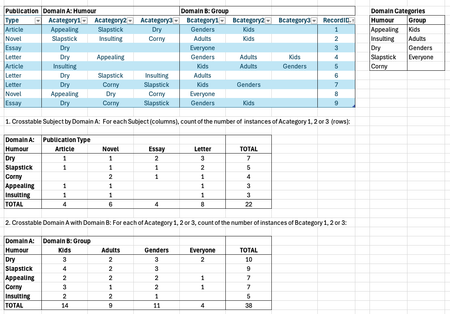
Hi, I am trying to figure out how to code for the resulting tables #1 and #2 in the screenshot, based on the data table. Each publication can be characterized by 1 to 3 categories of humour in domain...
- Jun 16, 2024
You can count your entries with a combination of FILTER() and SUMPRODUCT().
=SUMPRODUCT(--(TOCOL(FILTER(Publication[[Acategory1]:[Acategory3]],Publication[Type]=B$16),1)=$A17))COUNTIF() does not seem to work with a filtered list.


OliverScheurich
Jun 16, 2024Gold Contributor
=SUMPRODUCT(N(IF(($E$2:$G$10=C$14),($B$2:$B$10=$B15)+($C$2:$C$10=$B15)+($D$2:$D$10=$B15))))
The suggestion in the attached file uses SUMPRODUCT. The formula must be entered as an arrayformula with ctrl+shift+enter if someone doesn't work with Office 365 or Excel for the web or Excel 2021.