Forum Discussion

Diem_Carpe
May 14, 2021Copper Contributor
Count unique text value with specific text criteria (For excel 2016 version)
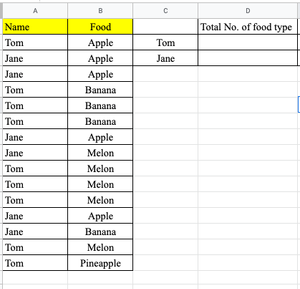
Hello All, I have a case to solve the total no. of food type by respective person as shown below, find out the total no. of food type owned by "Tom" & "Jane" without duplicating the food name. ...
- May 14, 2021
In D2 confirmed with Ctrl+Shift+Enter:
=SUM(IF($A$2:$A$16=C2,1/COUNTIFS($A$2:$A$16,C2,$B$2:$B$16,$B$2:$B$16)))
Fill down.

HansVogelaar
May 18, 2021MVP
You write "it allows the formula to count the blank cell". Do you mean that blank counts as a food type? So for example, the count for Jane would be 3 ("Apple", "Melon", blank)?

Diem_Carpe
May 20, 2021Copper Contributor
Sorry for the misleading description. the outcome shall skip counting the blank cell, e.g. Jane would be 2 ("Apple" & "Melon", but an error "#DIV/0!" was shown when i use the same formula.
- HansVogelaarMay 20, 2021MVP
In D2 confirmed with Ctrl+Shift+Enter:
=SUM(IF(($A$2:$A$16=C2)*($B$2:$B$16<>""),1/COUNTIFS($A$2:$A$16,C2,$B$2:$B$16,$B$2:$B$16)))
See the attached version.
- Diem_CarpeMay 21, 2021Copper ContributorIt works, many thanks!!!!!