Forum Discussion

Hayles739
Dec 21, 2019Copper Contributor
Count matching cells diagonally
I'm looking for a formula. I want to count cells diagonally that match the contents of the first cell. I want it to stop counting as soon as it reaches a cell that doesn't match. I hope this is maki...

Hayles739
Dec 23, 2019Copper Contributor
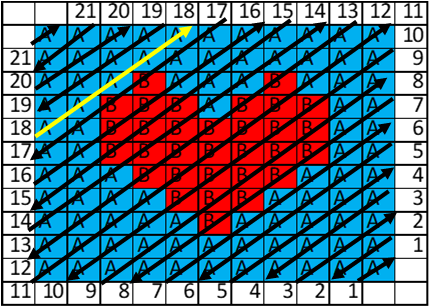
SergeiBaklan Ive added a picture to show the direction of the formulas (if that makes sense) and have made the line for number 17 yellow.
I was thinking before i asked on here that I could use if functions for each cell but at its largest I would need to add 70+ if functions for one cell so was looking for an easier way. The actual spreadsheet I want to analyse is 77x96 cells with each cell changing as I need to. Currently I print out the 77x96 cells and count them by hand.

SergeiBaklan
Dec 23, 2019Diamond Contributor
I believe that could be done easier even without VBA, but so fa r didn't find the solution. For your sample
for the helper columns in Q1
=TEXTJOIN("",TRUE,
IF( ISODD($P1),
INDEX($B$2:$L$12,
   LARGE(COLUMN(INDEX($A$1:$K$1,MAX(1,12-$P1)):INDEX($A$1:$K$1,MIN(11,22-$P1))  ),COLUMN($A$1:INDEX($A$1:$K$1, IF($P1<=11,$P1,22-$P1)   ))),
   COLUMN(INDEX($A$1:$K$1,MAX(1,12-$P1)):INDEX($A$1:$K$1,MIN(11,22-$P1)))
),
INDEX($B$2:$L$12,
   COLUMN(INDEX($A$1:$K$1,MAX(1,12-$P1)):INDEX($A$1:$K$1,MIN(11,22-$P1))),
   LARGE(COLUMN(INDEX($A$1:$K$1,MAX(1,12-$P1)):INDEX($A$1:$K$1,MIN(11,22-$P1))),COLUMN($A$1:INDEX($A$1:$K$1,IF($P1<=11,$P1,22-$P1))))
)
))
in R1
=TEXTJOIN("",1,
   IF(
      SUBSTITUTE(
         FREQUENCY(
            IF(MID(Q1,COLUMN($A:$U),1)="A",COLUMN($A:$U)),
            IF(MID(Q1,COLUMN($A:$U),1)="A",0, COLUMN($A:$U))
         ),
         0,""
      ) = "",
      "",
      SUBSTITUTE(
         FREQUENCY(
            IF(MID(Q1,COLUMN($A:$U),1)="A",COLUMN($A:$U)),
            IF(MID(Q1,COLUMN($A:$U),1)="A",0, COLUMN($A:$U))
         ),
         0,""
      ) & "A"
   ) &
   IF(
      SUBSTITUTE(
         FREQUENCY(
            IF(MID(Q1,COLUMN($A:$U),1)="B",COLUMN($A:$U)),
            IF(MID(Q1,COLUMN($A:$U),1)="B",0, COLUMN($A:$U))
         ),
         0,""
      ) = "",
      "",
      SUBSTITUTE(
         FREQUENCY(
            IF(MID(Q1,COLUMN($A:$U),1)="B",COLUMN($A:$U)),
            IF(MID(Q1,COLUMN($A:$U),1)="B",0,COLUMN($A:$U))
         ),0,""
      ) & "B"
   )
)
, in S1, T1 and U1
=LEFT(R1,2)
=MID(R1,3,2)
=MID(R1,5,2)
and drag all of them down.